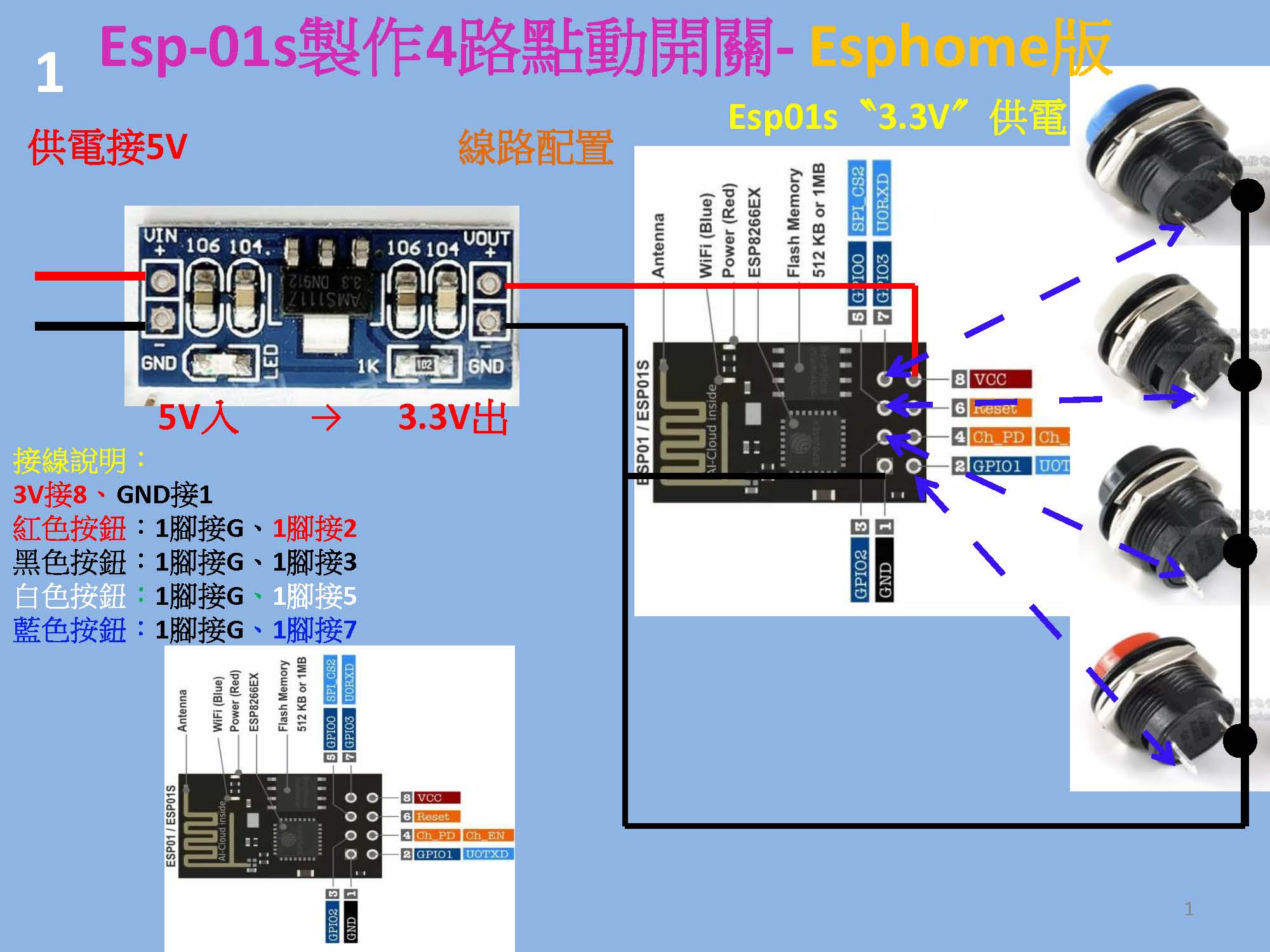
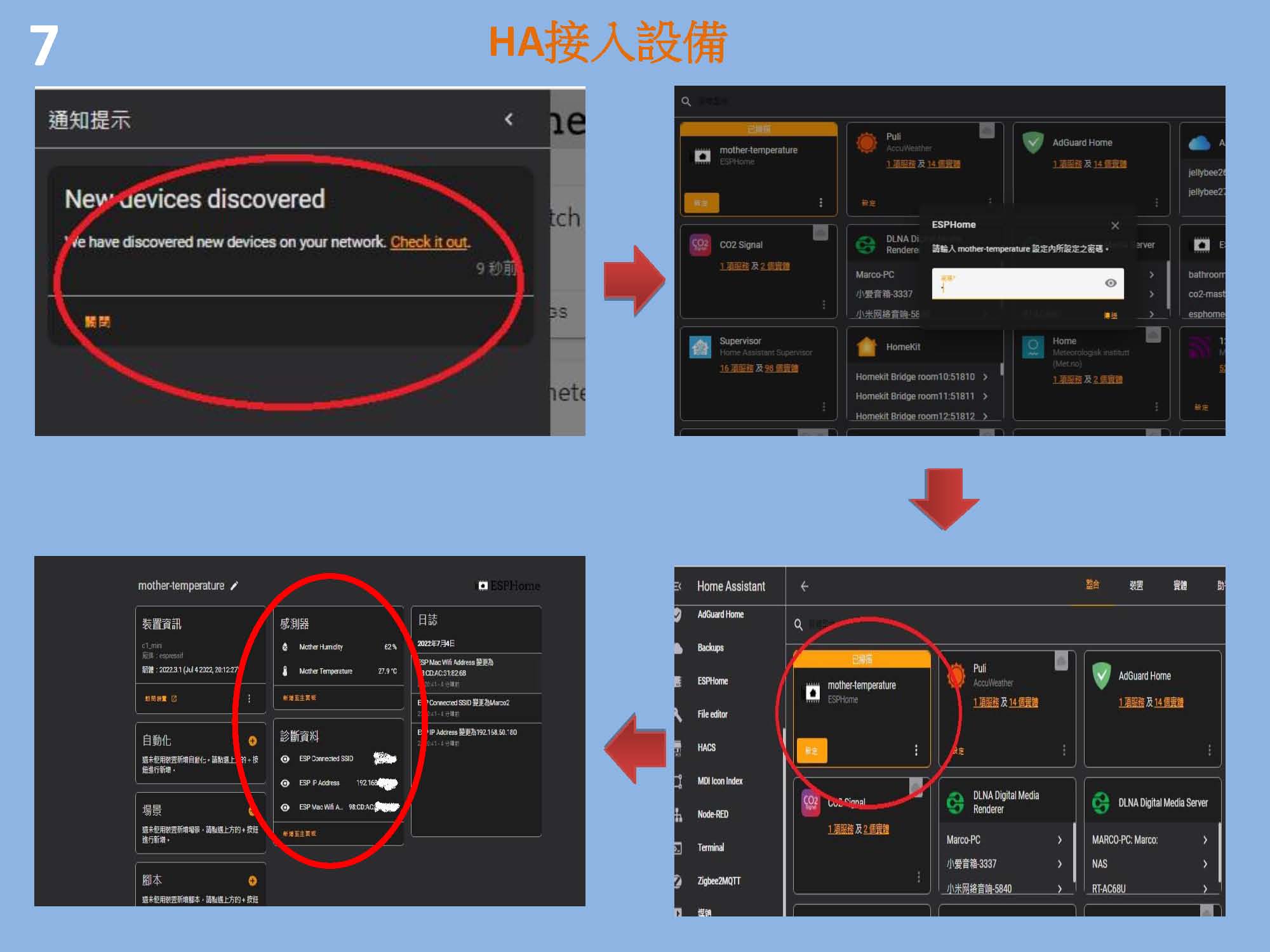
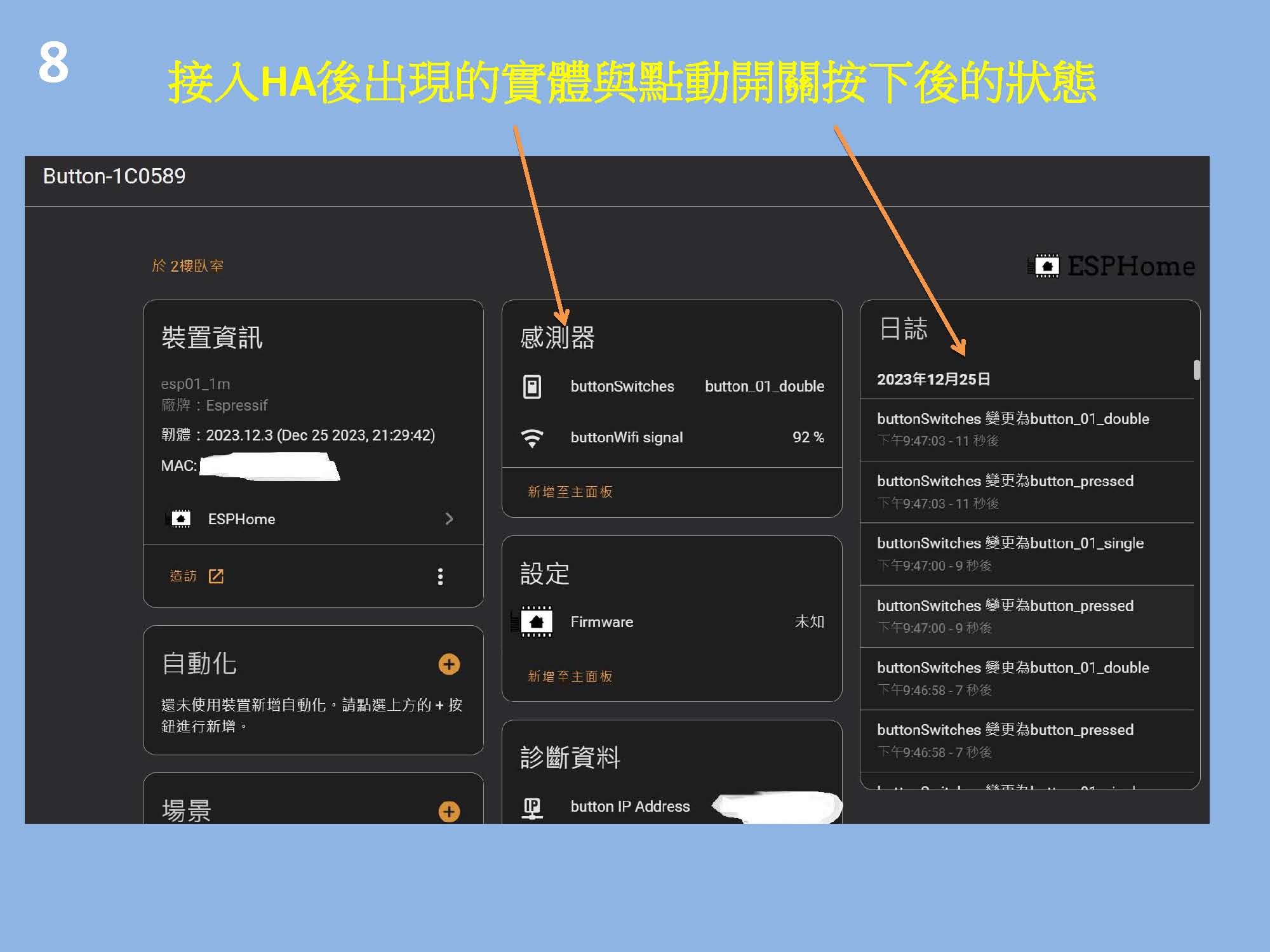
EspHome使用ESP-01S無線模塊利用GPIO1、GPIO2 、GPIO3和、GPIO0 腳位,連接四個實體復位開關製作”具有zigbee無線開關”的single, double, triple, quadruple, many and long模式,可以用node-red與ha內的自動化達成wifi版的無線開關




######################################################################################################
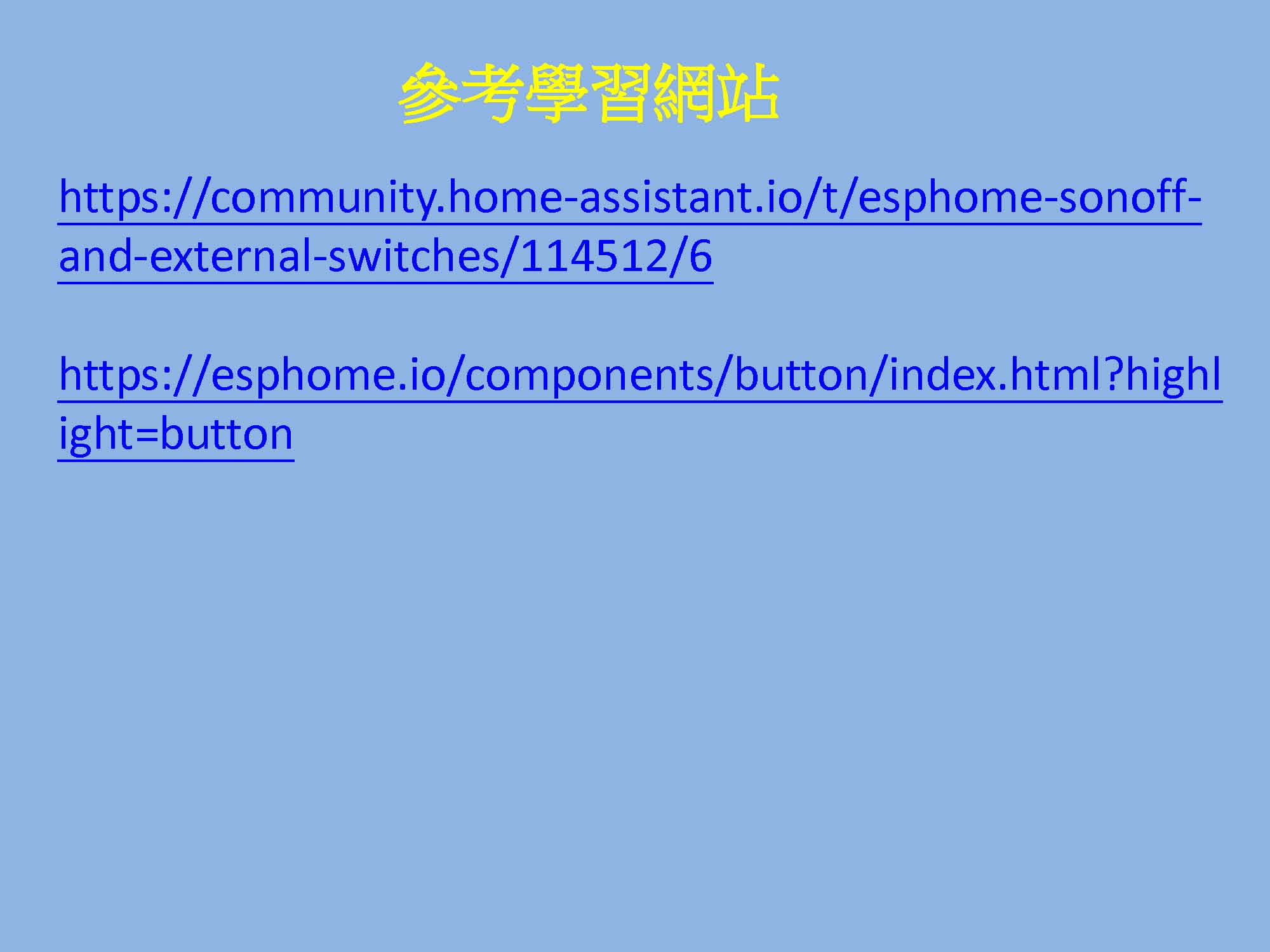
# https://community.home-assistant.io/t/esphome-sonoff-and-external-switches/114512/6
######################################################################################################
#4路
substitutions:
device_name: "button"
friendly_name: BB8-4路點動按鈕
esphome:
name: ${device_name}
name_add_mac_suffix: true
#name_add_mac_suffix 添加mac位址在name後面
#不需要再name後面增加mac位址需把此行註解掉
#缺點 ota時需產出bin並登入web頁面更新
#優點 每個設備加入時都會是不同的id方便辨識
esp8266: # 指定使用 ESP8266 平台
board: esp01_1m # 设置开发板型号为 ESP-01/01S (1MB Flash)
restore_from_flash: true # 启用从 Flash 恢复状态(断电重启后,保留之前的状态)
preferences:
flash_write_interval: 10s
packages:
device_web: !include templates/device_web.yaml
binary_sensor:
## Buton 01
- platform: gpio
id: button_01
pin:
number: GPIO2
mode: INPUT_PULLUP
inverted: True
filters:
- delayed_on: 50ms
- delayed_off: 50ms
on_multi_click: # 這種設定通常用來判斷「單擊」或「短按」的行為: ✅ 防止誤觸:確保使用者真的短按了按鍵,而不是因為抖動或誤觸。
- timing:
- ON for at most 1s
- OFF for at least 250ms # 減少 OFF 時間,提高識別成功率 預設400ms
then:
- text_sensor.template.publish:
id: buttons
state: "button_pressed" # 這行代碼是用來更新 text_sensor(文字傳感器)的狀態值。
- delay: 50ms
- text_sensor.template.publish:
id: buttons
state: "button_01_single"
- delay: 2s # 增加 2 秒延遲
- text_sensor.template.publish:
id: buttons
state: "" # 重設狀態
- timing:
- ON for at most 1s
- OFF for at most 399ms
- ON for at most 1s
- OFF for at least 400ms
then:
- text_sensor.template.publish:
id: buttons
state: "button_pressed"
- delay: 50ms
- text_sensor.template.publish:
id: buttons
state: "button_01_double"
- delay: 2s # 增加 2 秒延遲
- text_sensor.template.publish:
id: buttons
state: "" # 重設狀態
- timing:
- ON for at most 1s
- OFF for at most 399ms
- ON for at most 1s
- OFF for at most 399ms
- ON for at most 1s
- OFF for at least 400ms
then:
- text_sensor.template.publish:
id: buttons
state: "button_pressed"
- delay: 50ms
- text_sensor.template.publish:
id: buttons
state: "button_01_triple"
- delay: 2s # 增加 2 秒延遲
- text_sensor.template.publish:
id: buttons
state: "" # 重設狀態
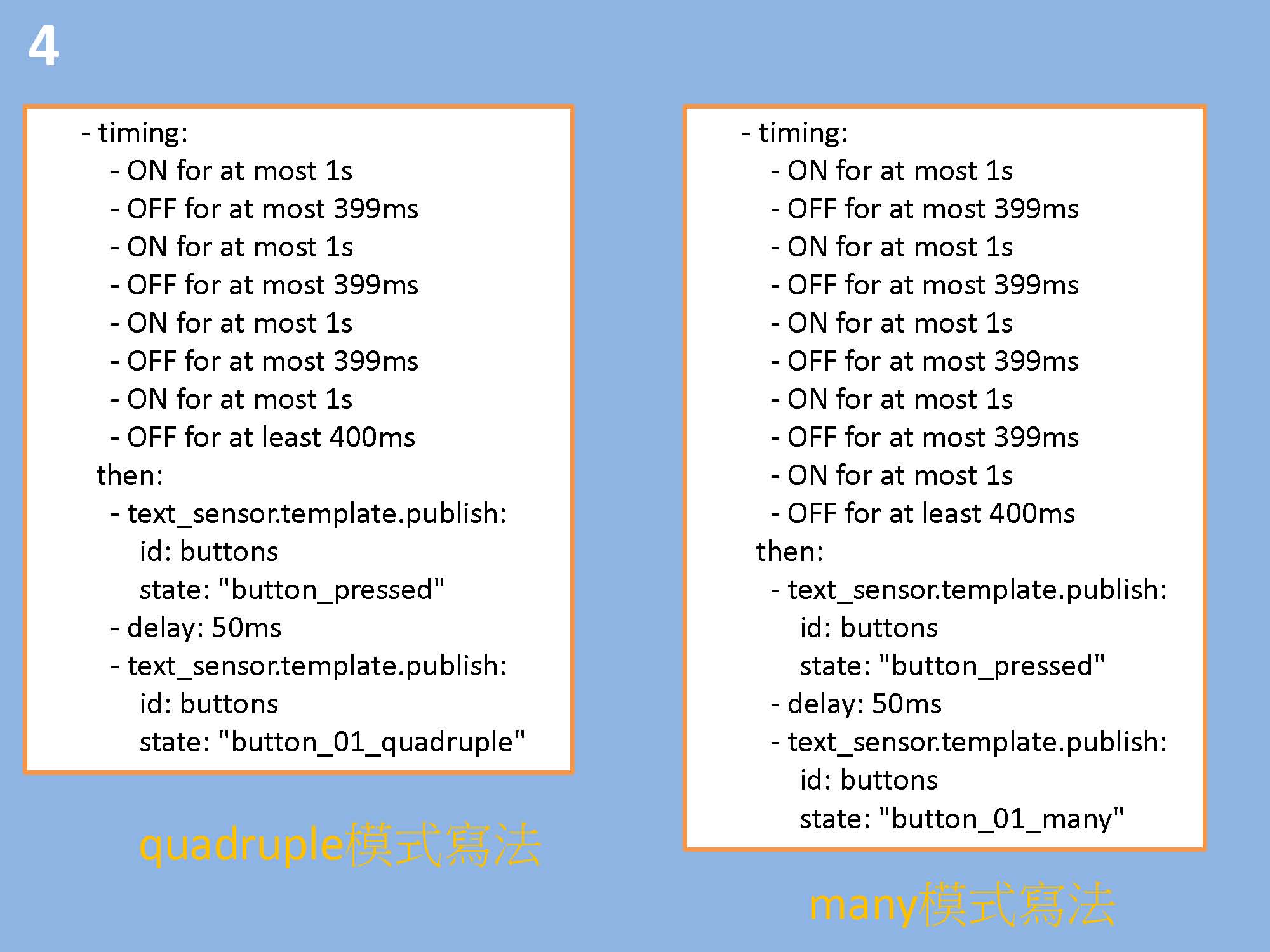
- timing:
- ON for at most 1s
- OFF for at most 399ms
- ON for at most 1s
- OFF for at most 399ms
- ON for at most 1s
- OFF for at most 399ms
- ON for at most 1s
- OFF for at least 400ms
then:
- text_sensor.template.publish:
id: buttons
state: "button_pressed"
- delay: 50ms
- text_sensor.template.publish:
id: buttons
state: "button_01_quadruple"
- delay: 2s # 增加 2 秒延遲
- text_sensor.template.publish:
id: buttons
state: "" # 重設狀態
- timing:
- ON for at most 1s
- OFF for at most 399ms
- ON for at most 1s
- OFF for at most 399ms
- ON for at most 1s
- OFF for at most 399ms
- ON for at most 1s
- OFF for at most 399ms
- ON for at least 400ms
then:
- text_sensor.template.publish:
id: buttons
state: "button_pressed"
- delay: 50ms
- text_sensor.template.publish:
id: buttons
state: "button_01_many"
- delay: 2s # 增加 2 秒延遲
- text_sensor.template.publish:
id: buttons
state: "" # 重設狀態
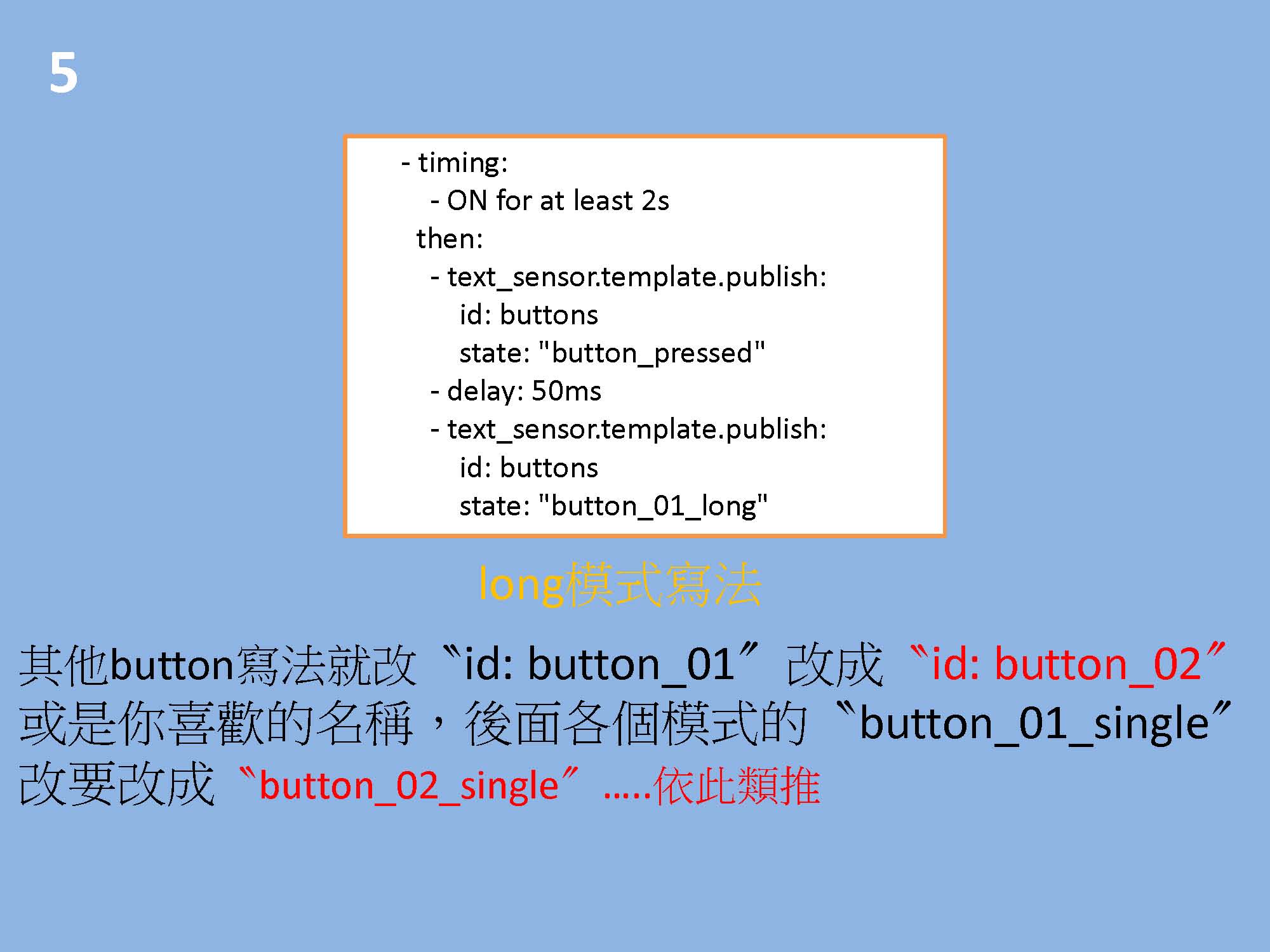
- timing:
- ON for at least 2s
then:
- text_sensor.template.publish:
id: buttons
state: "button_pressed"
- delay: 50ms
- text_sensor.template.publish:
id: buttons
state: "button_01_long"
- delay: 2s # 增加 2 秒延遲
- text_sensor.template.publish:
id: buttons
state: "" # 重設狀態
## Buton 02
- platform: gpio
id: button_02
pin:
number: GPIO0
mode: INPUT_PULLUP
inverted: True
filters:
- delayed_on: 50ms
- delayed_off: 50ms
on_multi_click:
- timing:
- ON for at most 1s
- OFF for at least 250ms # 減少 OFF 時間,提高識別成功率 預設400ms
then:
- text_sensor.template.publish:
id: buttons
state: "button_pressed"
- delay: 50ms
- text_sensor.template.publish:
id: buttons
state: "button_02_single"
- delay: 2s # 增加 2 秒延遲
- text_sensor.template.publish:
id: buttons
state: "" # 重設狀態
- timing:
- ON for at most 1s
- OFF for at most 399ms
- ON for at most 1s
- OFF for at least 400ms
then:
- text_sensor.template.publish:
id: buttons
state: "button_pressed"
- delay: 50ms
- text_sensor.template.publish:
id: buttons
state: "button_02_double"
- delay: 2s # 增加 2 秒延遲
- text_sensor.template.publish:
id: buttons
state: "" # 重設狀態
- timing:
- ON for at most 1s
- OFF for at most 399ms
- ON for at most 1s
- OFF for at most 399ms
- ON for at most 1s
- OFF for at least 400ms
then:
- text_sensor.template.publish:
id: buttons
state: "button_pressed"
- delay: 50ms
- text_sensor.template.publish:
id: buttons
state: "button_02_triple"
- delay: 2s # 增加 2 秒延遲
- text_sensor.template.publish:
id: buttons
state: "" # 重設狀態
- timing:
- ON for at most 1s
- OFF for at most 399ms
- ON for at most 1s
- OFF for at most 399ms
- ON for at most 1s
- OFF for at most 399ms
- ON for at most 1s
- OFF for at least 400ms
then:
- text_sensor.template.publish:
id: buttons
state: "button_pressed"
- delay: 50ms
- text_sensor.template.publish:
id: buttons
state: "button_02_quadruple"
- delay: 2s # 增加 2 秒延遲
- text_sensor.template.publish:
id: buttons
state: "" # 重設狀態
- timing:
- ON for at most 1s
- OFF for at most 399ms
- ON for at most 1s
- OFF for at most 399ms
- ON for at most 1s
- OFF for at most 399ms
- ON for at most 1s
- OFF for at most 399ms
- ON for at least 400ms
then:
- text_sensor.template.publish:
id: buttons
state: "button_pressed"
- delay: 50ms
- text_sensor.template.publish:
id: buttons
state: "button_02_many"
- delay: 2s # 增加 2 秒延遲
- text_sensor.template.publish:
id: buttons
state: "" # 重設狀態
- timing:
- ON for at least 2s
then:
- text_sensor.template.publish:
id: buttons
state: "button_pressed"
- delay: 50ms
- text_sensor.template.publish:
id: buttons
state: "button_02_long"
- delay: 2s # 增加 2 秒延遲
- text_sensor.template.publish:
id: buttons
state: "" # 重設狀態
## Buton 03
- platform: gpio
id: button_03
pin:
number: GPIO3
mode: INPUT_PULLUP
inverted: True
filters:
- delayed_on: 50ms
- delayed_off: 50ms
on_multi_click:
- timing:
- ON for at most 1s
- OFF for at least 250ms # 減少 OFF 時間,提高識別成功率 預設400ms
then:
- text_sensor.template.publish:
id: buttons
state: "button_pressed"
- delay: 50ms
- text_sensor.template.publish:
id: buttons
state: "button_03_single"
- delay: 2s # 增加 2 秒延遲
- text_sensor.template.publish:
id: buttons
state: "" # 重設狀態
- timing:
- ON for at most 1s
- OFF for at most 399ms
- ON for at most 1s
- OFF for at least 400ms
then:
- text_sensor.template.publish:
id: buttons
state: "button_pressed"
- delay: 50ms
- text_sensor.template.publish:
id: buttons
state: "button_03_double"
- delay: 2s # 增加 2 秒延遲
- text_sensor.template.publish:
id: buttons
state: "" # 重設狀態
- timing:
- ON for at most 1s
- OFF for at most 399ms
- ON for at most 1s
- OFF for at most 399ms
- ON for at most 1s
- OFF for at least 400ms
then:
- text_sensor.template.publish:
id: buttons
state: "button_pressed"
- delay: 50ms
- text_sensor.template.publish:
id: buttons
state: "button_03_triple"
- delay: 2s # 增加 2 秒延遲
- text_sensor.template.publish:
id: buttons
state: "" # 重設狀態
- timing:
- ON for at most 1s
- OFF for at most 399ms
- ON for at most 1s
- OFF for at most 399ms
- ON for at most 1s
- OFF for at most 399ms
- ON for at most 1s
- OFF for at least 400ms
then:
- text_sensor.template.publish:
id: buttons
state: "button_pressed"
- delay: 50ms
- text_sensor.template.publish:
id: buttons
state: "button_03_quadruple"
- delay: 2s # 增加 2 秒延遲
- text_sensor.template.publish:
id: buttons
state: "" # 重設狀態
- timing:
- ON for at most 1s
- OFF for at most 399ms
- ON for at most 1s
- OFF for at most 399ms
- ON for at most 1s
- OFF for at most 399ms
- ON for at most 1s
- OFF for at most 399ms
- ON for at least 400ms
then:
- text_sensor.template.publish:
id: buttons
state: "button_pressed"
- delay: 50ms
- text_sensor.template.publish:
id: buttons
state: "button_03_many"
- delay: 2s # 增加 2 秒延遲
- text_sensor.template.publish:
id: buttons
state: "" # 重設狀態
- timing:
- ON for at least 2s
then:
- text_sensor.template.publish:
id: buttons
state: "button_pressed"
- delay: 50ms
- text_sensor.template.publish:
id: buttons
state: "button_03_long"
- delay: 2s # 增加 2 秒延遲
- text_sensor.template.publish:
id: buttons
state: "" # 重設狀態
## Buton 04
- platform: gpio
id: button_04
pin:
number: GPIO1
mode: INPUT_PULLUP
inverted: True
filters:
- delayed_on: 50ms
- delayed_off: 50ms
on_multi_click:
- timing:
- ON for at most 1s
- OFF for at least 250ms # 減少 OFF 時間,提高識別成功率 預設400ms
then:
- text_sensor.template.publish:
id: buttons
state: "button_pressed"
- delay: 50ms
- text_sensor.template.publish:
id: buttons
state: "button_04_single"
- delay: 2s # 增加 2 秒延遲
- text_sensor.template.publish:
id: buttons
state: "" # 重設狀態
- timing:
- ON for at most 1s
- OFF for at most 399ms
- ON for at most 1s
- OFF for at least 400ms
then:
- text_sensor.template.publish:
id: buttons
state: "button_pressed"
- delay: 50ms
- text_sensor.template.publish:
id: buttons
state: "button_04_double"
- delay: 2s # 增加 2 秒延遲
- text_sensor.template.publish:
id: buttons
state: "" # 重設狀態
- timing:
- ON for at most 1s
- OFF for at most 399ms
- ON for at most 1s
- OFF for at most 399ms
- ON for at most 1s
- OFF for at least 400ms
then:
- text_sensor.template.publish:
id: buttons
state: "button_pressed"
- delay: 50ms
- text_sensor.template.publish:
id: buttons
state: "button_04_triple"
- delay: 2s # 增加 2 秒延遲
- text_sensor.template.publish:
id: buttons
state: "" # 重設狀態
- timing:
- ON for at most 1s
- OFF for at most 399ms
- ON for at most 1s
- OFF for at most 399ms
- ON for at most 1s
- OFF for at most 399ms
- ON for at most 1s
- OFF for at least 400ms
then:
- text_sensor.template.publish:
id: buttons
state: "button_pressed"
- delay: 50ms
- text_sensor.template.publish:
id: buttons
state: "button_04_quadruple"
- delay: 2s # 增加 2 秒延遲
- text_sensor.template.publish:
id: buttons
state: "" # 重設狀態
- timing:
- ON for at most 1s
- OFF for at most 399ms
- ON for at most 1s
- OFF for at most 399ms
- ON for at most 1s
- OFF for at most 399ms
- ON for at most 1s
- OFF for at most 399ms
- ON for at least 400ms
then:
- text_sensor.template.publish:
id: buttons
state: "button_pressed"
- delay: 50ms
- text_sensor.template.publish:
id: buttons
state: "button_04_many"
- delay: 2s # 增加 2 秒延遲
- text_sensor.template.publish:
id: buttons
state: "" # 重設狀態
- timing:
- ON for at least 2s
then:
- text_sensor.template.publish:
id: buttons
state: "button_pressed"
- delay: 50ms
- text_sensor.template.publish:
id: buttons
state: "button_04_long"
- delay: 2s # 增加 2 秒延遲
- text_sensor.template.publish:
id: buttons
state: "" # 重設狀態
sensor:
- platform: wifi_signal
id: wifi_1
update_interval: 60s
- platform: template
name: ${device_name}Wifi signal
unit_of_measurement: '%'
accuracy_decimals: 0
icon: "mdi:wifi"
lambda: |-
if (id( wifi_1).state < -92.0)
return 100.0;
if (id( wifi_1).state > -21.0)
return 1.0;
else
return round(( -0.0154 * id( wifi_1).state * id( wifi_1).state ) - ( 0.3794 * id( wifi_1).state ) + 98.182 );
- platform: uptime
name: Uptime Sensor
button:
- platform: restart
id: restart_button
name: "${device_name} Restart"
text_sensor:
- platform: template
name: ${device_name}Switches
id: buttons
icon: "mdi:light-switch"
lambda: |-
return {};
- platform: wifi_info
ip_address:
name: ${device_name} IP Address
icon: "mdi:ip-network"
ssid:
name: ${device_name} SSID
icon: "mdi:signal-variant"
mac_address:
name: ${device_name} Mac Wifi Address
icon: "mdi:wifi-marker"
- platform: version
name: "ESPHome Version"
status_led:
pin:
number: GPIO13
inverted: true