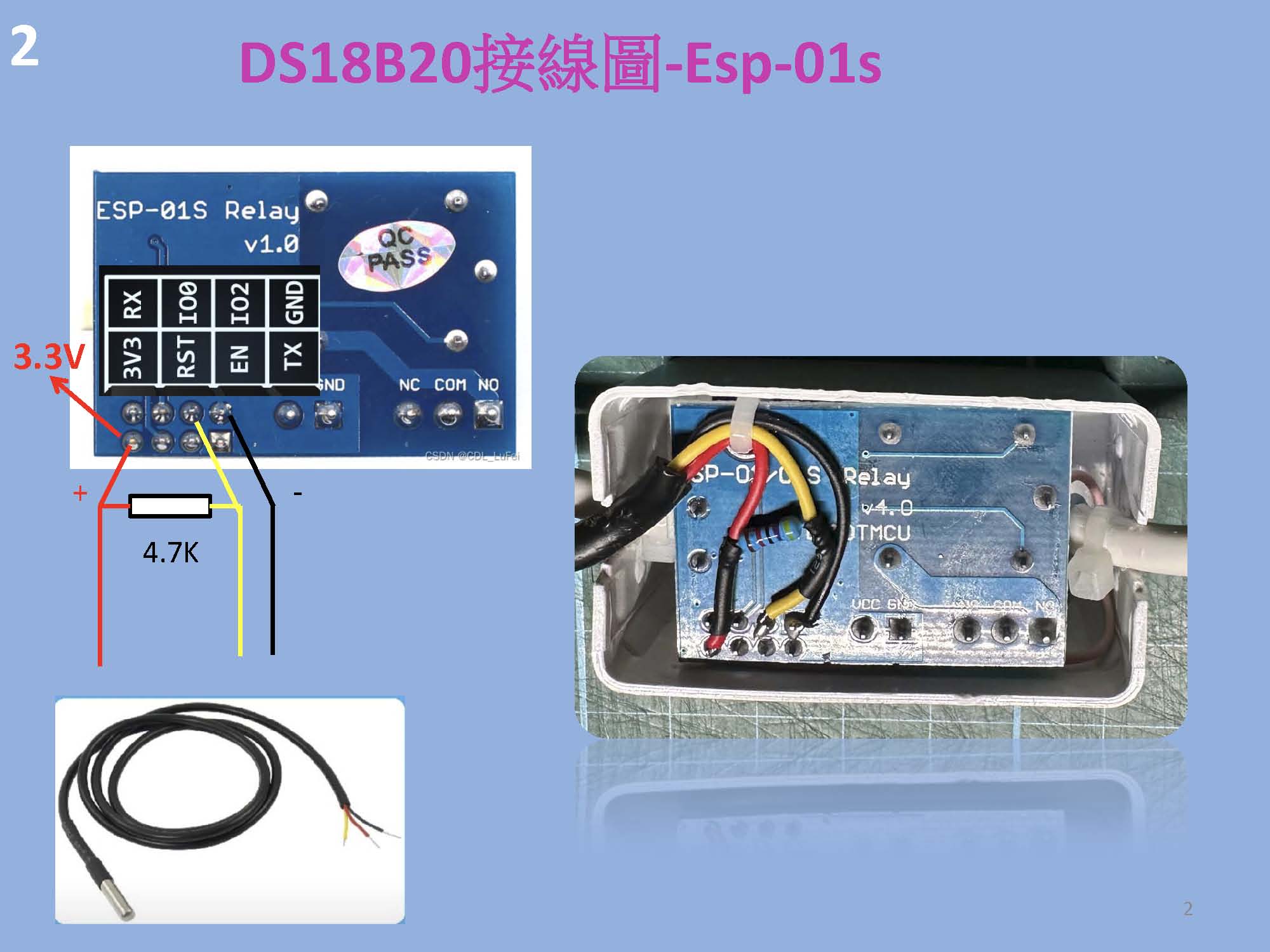
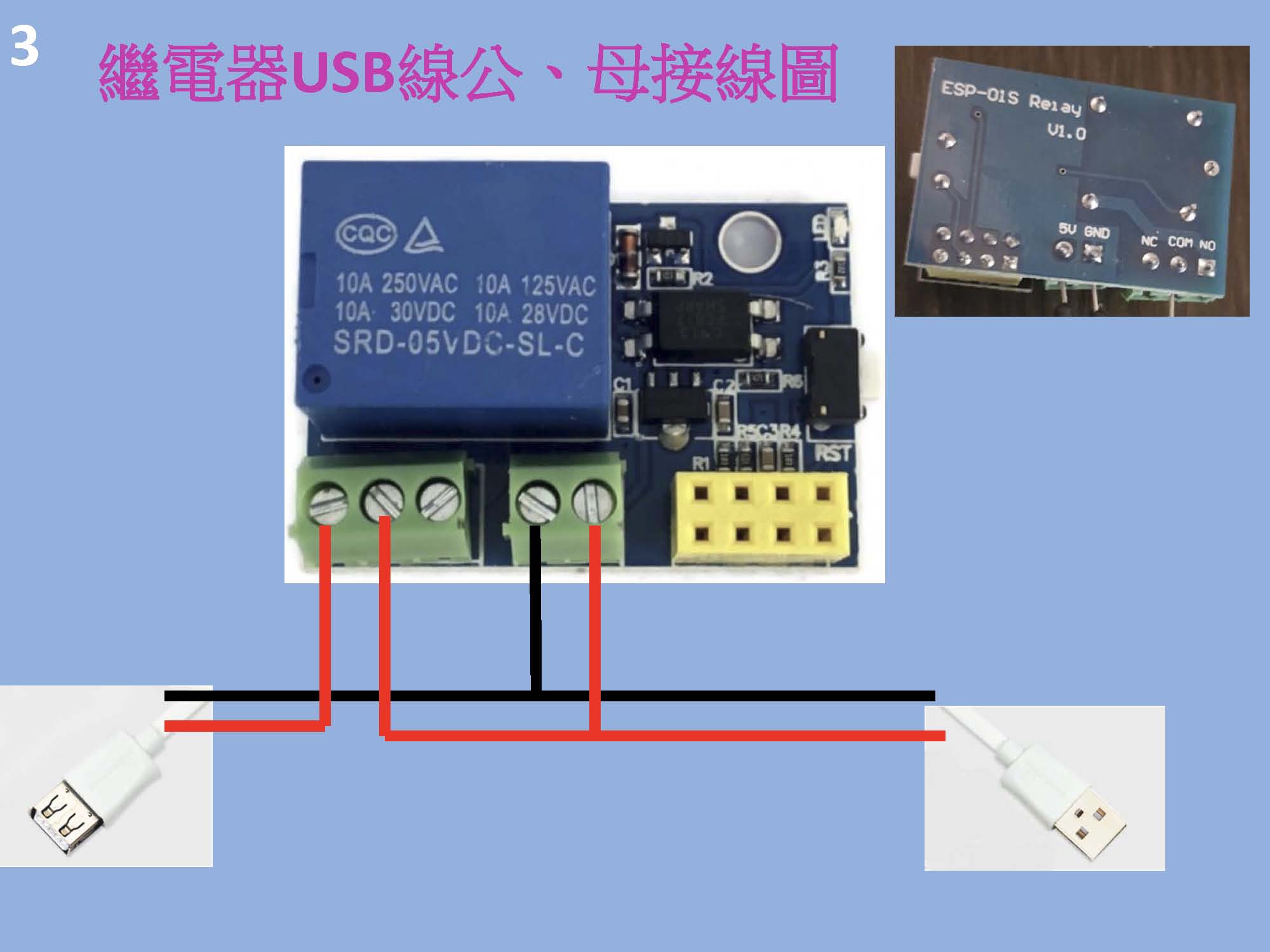
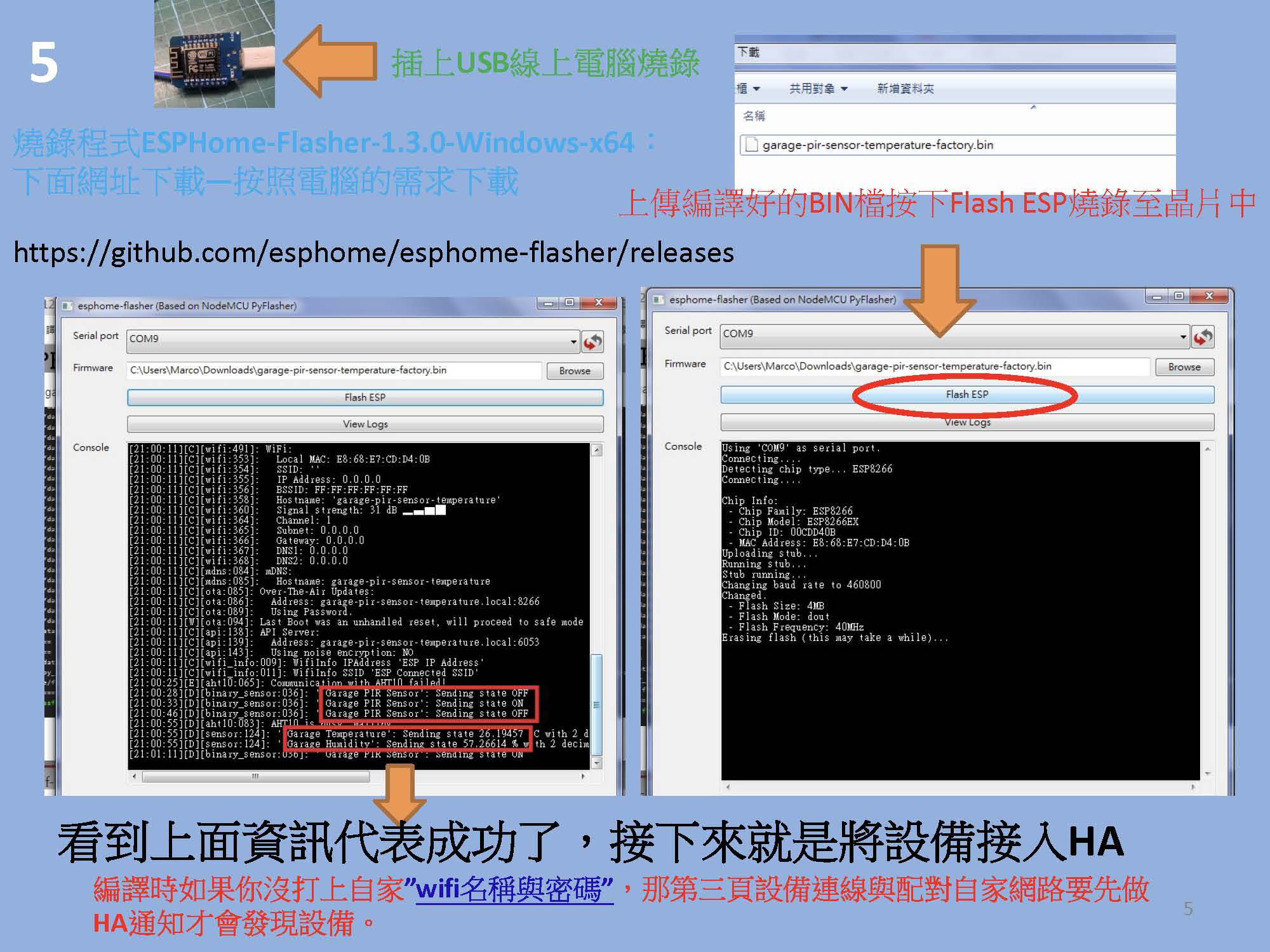
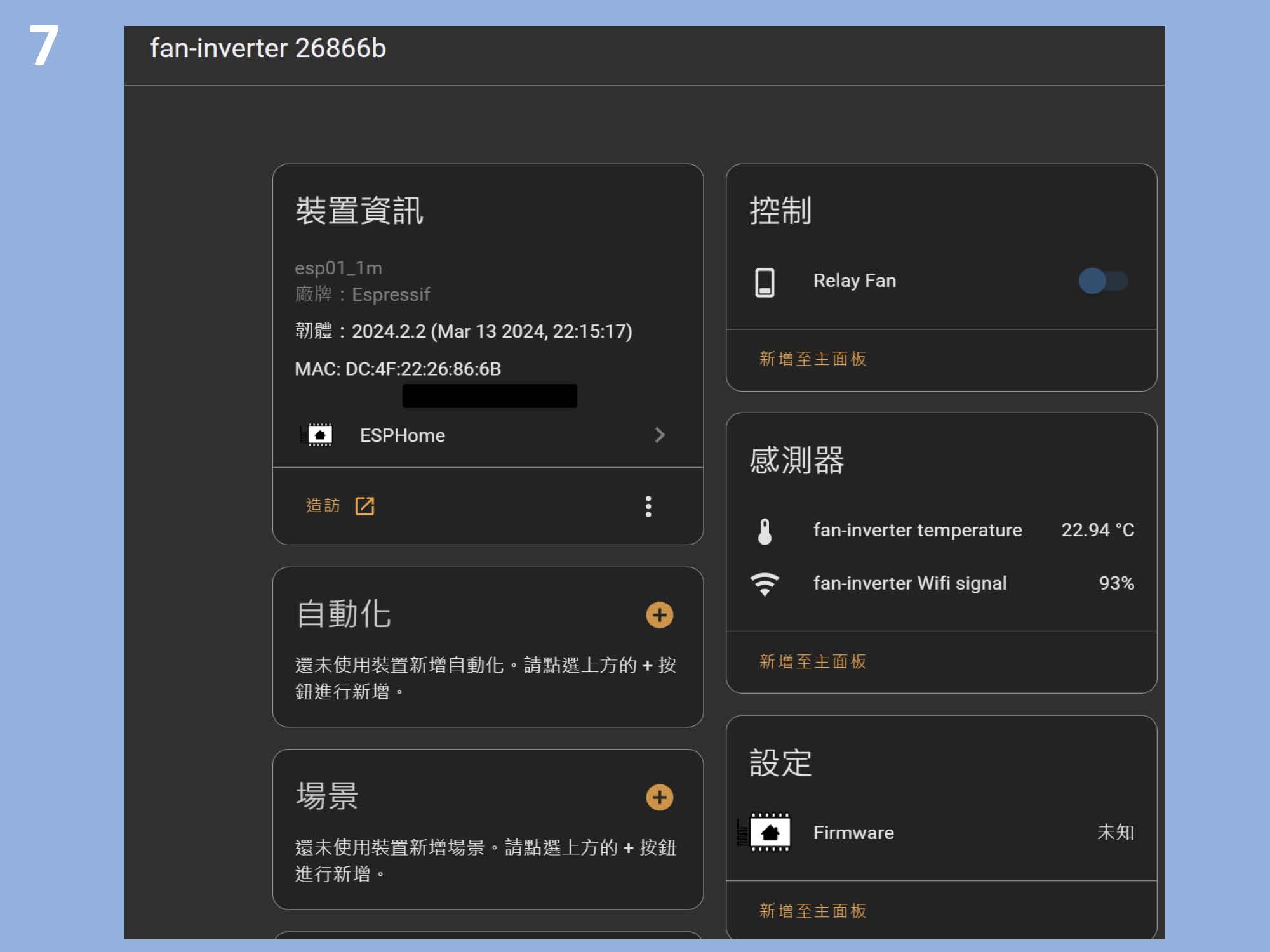
# https://www.youtube.com/watch?v=NmcQmRjwUoM    https://drive.google.com/file/d/1SCDB8FgM4hrNS8cLoz7N_stZcKY-p2Pm/view   https://drive.google.com/file/d/1hVx7aHxts3s3TX4m_DvSsFWymbWmp8Lm/view

substitutions:
  device_name: ds18b20-relay  # 設備名稱

esphome:
  name: ${device_name}
  friendly_name: ds18b20-relay
  name_add_mac_suffix: true

esp8266:
  board: esp01_1m

# 啟用日誌記錄功能
logger:

# 啟用 Home Assistant API
api:
  reboot_timeout: 0s

ota:
  - platform: esphome

wifi:
  ssid: !secret wifi_ssid
  password: !secret wifi_password
  fast_connect: true  # 直接連配對好的 Wi-Fi,不掃描其他 Wi-Fi
  reboot_timeout: 120s

  # 啟用備援熱點(Fallback Hotspot),以防 Wi-Fi 無法連接
  ap:
    ssid: "${device_name} Fallback Hotspot"
    password: "12345678"
    ap_timeout: 120s

# 啟用 Web Server
web_server:
  port: 80

captive_portal:

time:
  - platform: homeassistant
    id: homeassistant_time

# ++++++++++ 繼電器輸出控制 ++++++++++
switch:
  - platform: gpio
    pin:
      number: GPIO00
      inverted: True
    name: "Relay"
    id: relay_fan

# +++++++++ DS18B20 溫度數位感測器 ++++++++++
one_wire:
  - platform: gpio  # Specify the platform
    id: bus1        # Assign an ID for this one-wire bus
    pin: GPIO2      # Specify the GPIO pin connected to the 1-Wire data line

sensor:
  - platform: dallas_temp
    one_wire_id: bus1  # One-Wire 總線 ID
    address: 0xbe3c46e3812f0228  # DS18B20 溫度感測器地址 address:  0x920000006a3d8728 # The address of your DS18B20 sensor
    name: "${device_name} temperature"  # 顯示名稱
    id: t_afd  # 感測器內部 ID
    update_interval: 5s  # 每 5 秒讀取一次溫度
    accuracy_decimals: 2  # 溫度小數點位數
    filters:
      - offset: 0.0  # 溫度修正,不做偏移

    # 每次溫度更新後進行檢查
    on_value:
      then:
        - if:
            condition:
              lambda: |-
                // 如果目前溫度小於風扇關閉設定值
                return id(t_afd).state < id(fan_off_temp).state;
            then:
              - switch.turn_off: relay_fan  # 關閉風扇(即使手動打開也會被關)
        - if:
            condition:
              lambda: |-
                // 如果目前溫度大於風扇開啟設定值
                return id(t_afd).state > id(fan_on_temp).state;
            then:
              - switch.turn_on: relay_fan  # 開啟風扇


  # Wi-Fi 訊號強度感測器
  - platform: wifi_signal
    id: wifi_1
    update_interval: 60s

  # Wi-Fi 訊號百分比模板感測器
  - platform: template
    name: ${device_name} Wifi signal
    unit_of_measurement: '%'
    accuracy_decimals: 0
    icon: "mdi:wifi"
    lambda: |-
      if (id(wifi_1).state < -92.0)
        return 100.0;
      if (id(wifi_1).state > -21.0)
        return 1.0;
      else
        return round((-0.0154 * id(wifi_1).state * id(wifi_1).state) - (0.3794 * id(wifi_1).state) + 98.182);

  # 系統運行時間感測器
  - platform: uptime
    name: "${device_name} Uptime"

# 可調整的風扇開啟/關閉溫度設定(在 Home Assistant 中設置)
# +++++++++ DS18B20 溫度數位感測器 ++++++++++
# 采用美国Dallas 半导体公司的数字化温度传感器DS18B20,采用导热性高的密封胶灌封,保证了温度传感器的高灵敏性,极小的温度延迟。该温度传感器支持“一线总线”接口(1-Wire)
# 测量温度范围为 -55°C~+125°C,在-10~+85°C范围内,精度为 ±0.5°C。现场温度直接以“一线总线”的数字方式传输,大大提高了系统的抗干扰性。适合于恶劣环境的现场温度测量。
# DS18B20数字温度传感器都具有的编号,温度采集设备通过编号来识别对应的温度传感器。传感器的引线长度可根据用户需要定制。
number:
  - platform: template
    name: "Set temperature on"  # 設定風扇開啟的溫度
    id: fan_on_temp  # 對應內部 ID
    optimistic: true  # 立即更新狀態,不等待回傳
    min_value: 50.0  # 最低 50°C
    max_value: 100.0  # 最高 100°C
    step: 0.5  # 每次調整 0.5°C
    unit_of_measurement: "°C"  # 顯示單位:攝氏
    mode: box  # 使用輸入框模式(而不是滑動條)

  - platform: template
    name: "Set temperature off"  # 設定風扇關閉的溫度
    id: fan_off_temp  # 對應內部 ID
    optimistic: true  # 立即更新狀態
    min_value: 0.0  # 最低 0°C
    max_value: 50.0  # 最高 50°C
    step: 0.5  # 每次調整 0.5°C
    unit_of_measurement: "°C"  # 顯示單位:攝氏
    mode: box  # 使用輸入框模式


text_sensor:
  # Wi-Fi 資訊文字感測器(IP、SSID、MAC 位址)
  - platform: wifi_info
    ip_address:
      name: ${device_name} IP Address
      icon: "mdi:wifi"
    ssid:
      name: ${device_name} Connected SSID
      icon: "mdi:wifi"
    mac_address:
      name: ${device_name} Mac Wifi Address
      icon: "mdi:wifi-marker"

  # ESPHome 的版本資訊感測器
  - platform: version
    name: "ESPHome Version"