Diy_Esphome+WT32 ETH01之2
圖內接入傳感器提供情境自動化使用

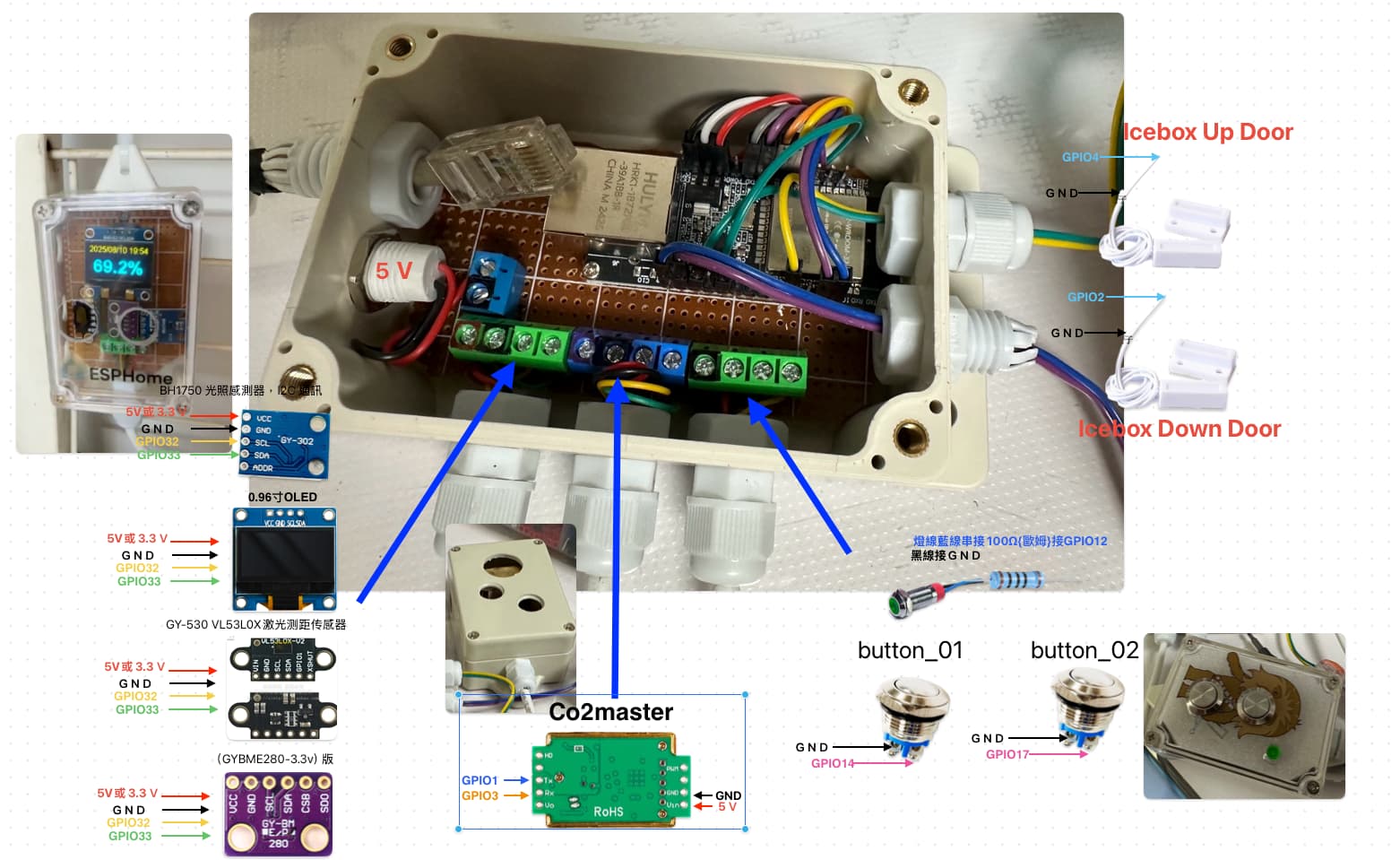
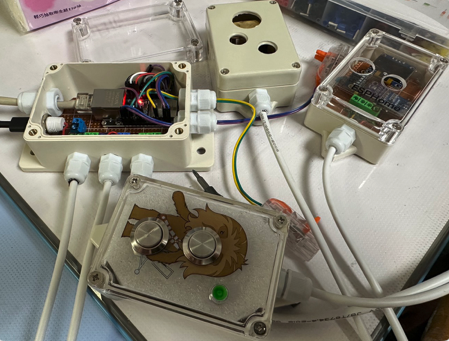
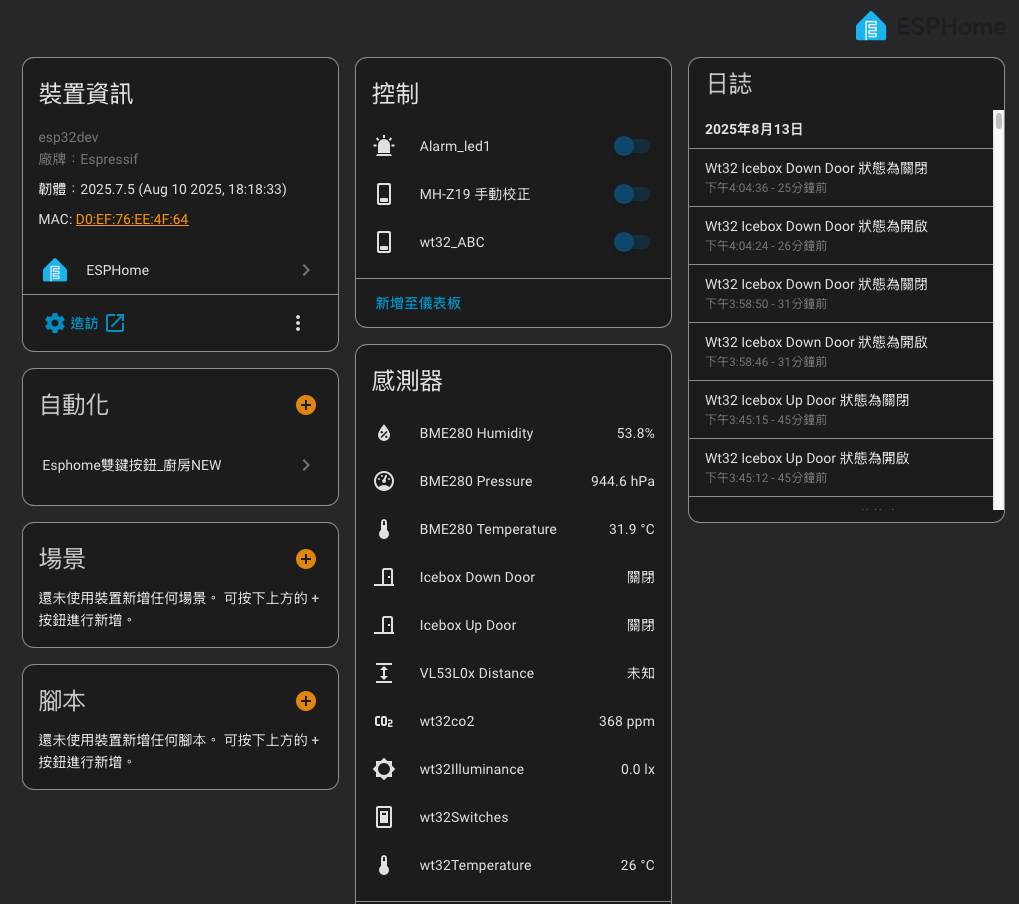
# 參考來源:
# https://www.nmking.io/index.php/2022/12/17/757/
# https://www.youtube.com/watch?v=_kUnoKP-RY4

substitutions:
  device_name: wt32  # 定義裝置名稱變數,方便整個配置中統一使用與修改
  friendly_name: 廚房有線Sensor
##############################################################################################################################################################################
esphome:
  name: ${device_name}  # 使用 substitutions 中的名稱作為裝置名稱,會用於網路辨識和日誌
  on_boot:
    priority: -100      # 在所有元件初始化後執行
    then:
      - switch.turn_off: gas_alarm_led
##############################################################################################################################################################################
esp32:
  board: esp32dev       # 指定 ESP32 開發板型號,通用型號 esp32dev
  framework:
    type: esp-idf      # 使用 Arduino 框架,簡單且廣泛支援
##############################################################################################################################################################################
# Ethernet 有線網路設定(WT32-ETH01 預設 LAN8720 PHY)
ethernet:
  type: LAN8720            # 使用 LAN8720 以太網 PHY 晶片
  mdc_pin: GPIO23          # 管理時鐘腳位,控制 PHY
  mdio_pin: GPIO18         # 管理資料腳位,傳送管理資料
  clk:                     # 以 GPIO0 作為時鐘輸入,WT32-ETH01 預設設計,GPIO0 為啟動用腳位,接線需小心
    pin: GPIO0
    mode: CLK_EXT_IN
  phy_addr: 1              # PHY 晶片地址,通常為 0 或 1
  power_pin: GPIO16        # PHY 電源控制腳位,若硬體無此功能可刪除
##############################################################################################################################################################################
logger:
  baud_rate: 0          # 禁用 UART 日誌輸出,避免佔用串口資源,適合 OTA 或網路日誌
##############################################################################################################################################################################
api:
  reboot_timeout: 0s    # 禁止自動重啟,避免錯誤導致無限重啟
  services:
    - service: mhz19_calibrate_zero
      then:
        - mhz19.calibrate_zero: Co2master
##############################################################################################################################################################################
ota:
  - platform: esphome   # 啟用 OTA 空中更新功能,方便遠端更新韌體
##############################################################################################################################################################################
web_server:
  port: 80              # 啟用 HTTP 伺服器,方便瀏覽器查看裝置狀態
##############################################################################################################################################################################
time:
  - platform: homeassistant  # 使用 Home Assistant 作為時間來源,同步裝置時間
    id: esptime
####################################################################################################################
uart:
  rx_pin: GPIO3
  tx_pin: GPIO1
  baud_rate: 9600
##############################################################################################################################################################################
i2c:
  sda: 33               # I2C SDA 腳位,連接 I2C 感測器的數據線
  scl: 32               # I2C SCL 腳位,連接 I2C 感測器的時鐘線
  scan: true            # 啟動時自動掃描 I2C 總線上的裝置,方便偵錯
  frequency: 100kHz
##############################################################################################################################################################################
sensor:
  - platform: uptime             # 裝置運行時間感測器,單位轉為小時
    name: "Uptime"
    filters:
      - lambda: return x / 3600;
    unit_of_measurement: "hours"
    accuracy_decimals: 1
##############################################################################################################################################################################
  - platform: vl53l0x                # GY-530 VL53L0X激光测距传感器
    name: "VL53L0x Distance"         # 感測器名稱,會顯示在 Home Assistant
    address: 0x29                    # I2C 裝置位址,預設為 0x29
    update_interval: 2s              # 更新頻率,2秒讀取一次距離數據
    long_range: false                # 是否啟用長距離模式(true 可增加量測距離,但準確度可能下降)
    unit_of_measurement: "m"         # 單位為公尺 (meter)
    accuracy_decimals: 2             # 顯示小數點後兩位
    id: distance_sensor              # 唯一 ID,方便在其他地方引用該感測器數據
##############################################################################################################################################################################
  - platform: bme280_i2c             #(GYBME280-3.3v)版
    temperature:
      name: "${device_name} BME280 Temperature"
      filters:                            #以下內容為溫度校驗結果,可自行修改,需放置一個晚上穩定才準確
        - calibrate_linear:
            - 26 -> 29.5               #ESPhome實際讀取溫度->校驗後溫度
            - 28 -> 31.5              #ESPhome實際讀取溫度->校驗後溫度
      oversampling: 16x
      id: R1
    humidity:
      name: "${device_name} BME280 Humidity"
 #     filters:                           #以下內容為濕度校驗結果,可自行修改,需放置一個晚上穩定才準確
 #       - calibrate_linear:
 #           - 48.7 -> 56.0         #ESPhome實際讀取濕度->校驗後濕度
 #           - 50.7 -> 58.1         #ESPhome實際讀取濕度->校驗後濕度
 #     oversampling: 16x
      id: R2
    pressure:
      name: "${device_name} BME280 Pressure"
      id: R3
    address: 0x76
    update_interval: 20s
##############################################################################################################################################################################
  - platform: bh1750                 # BH1750 光照感測器,I2C 通訊
    name: "${device_name}Illuminance"
    id: R5
    address: 0x23
    update_interval: 20s
##############################################################################################################################################################################
  - platform: mhz19   # GND+5V+GPIO1+GPIO3
    id: Co2master
    update_interval: 30s
    automatic_baseline_calibration: false  #true 表示開啟ABC功能/如果設為 false,則關閉 ABC,適合密閉或無法定期通風的環境。
    co2:
      name: "${device_name}co2"
      id: R6
      filters:
        - sliding_window_moving_average:   ### sliding window moving average(滑動視窗移動平均),可以用來平滑數值輸出,降低雜訊 ###
            window_size: 3                 ### 維持一個長度為 3 的資料視窗,也就是最近的 3 筆讀值 ###
            send_every: 3                  ### 每收到 3 筆資料後才送出一次平均值。###
    temperature:
      name: "${device_name}Temperature"
##############################################################################################################################################################################
switch:
  - platform: gpio              # 警報 LED 控制開關
    pin: GPIO12                  # 連接 LED 的 GPIO12 腳位
    restore_mode: ALWAYS_OFF    # 裝置重啟後預設關閉 LED
    inverted: no
    id: gas_alarm_led
    name: "${device_name} alarm_led1"
    icon: "mdi:alarm-light"
##############################################################################################################################################################################
# mhz19校正
  - platform: template
    name: "${device_name}_ABC"   #自動基線校正(ABC)功能:感測器會在運行過程中,根據長期最低的 CO2 讀數自動調整零點基準,避免長時間使用後基準點漂移。設備放在戶外或是通風良好地方時開啟
    optimistic: true
    on_turn_on:
      mhz19.abc_enable: Co2master
    on_turn_off:
      mhz19.abc_disable: Co2master
  - platform: template
    id: mh_z19_manual_calibrate
    name: "MH-Z19 手動校正"        #手動校正前先放戶外約 20 分鐘穩定環境,校正後再放戶外約 5~15 分鐘讓感測器內部數值穩定,讀數才會接近 400 ppm
    turn_on_action:
      - uart.write: [0xFF, 0x01, 0x87, 0x00, 0x00, 0x00, 0x00, 0x00, 0x78]
      - delay: 1s
      - switch.turn_off: mh_z19_manual_calibrate
############################################################################################################################################################################
font:
  - file: "arial.ttf"
    id: font1
    size: 16                        # 小字體(顯示時間)
  - file: "arialbd.ttf"
    id: font2
    size: 20                        # 中字體(保留)
  - file: "arialbd.ttf"
    id: font3
    size: 30
  - file: "arialbd.ttf"
    id: font5
    size: 38                        # 大字體(顯示溫度)
############################################################################################################################################################################
display:
  - platform: ssd1306_i2c
    model: SSD1306_128X64
    address: 0x3C
    id: my_display
    pages:
      - id: page1
        lambda: |-
          it.strftime(64, 0, id(font1), TextAlign::TOP_CENTER, "%Y/%m/%d %H:%M", id(esptime).now());
          it.printf(64, 56, id(font5), TextAlign::BASELINE_CENTER, "%.1f°C", id(R1).state);
      - id: page2
        lambda: |-
          it.strftime(64, 0, id(font1), TextAlign::TOP_CENTER, "%Y/%m/%d %H:%M", id(esptime).now());
          it.printf(64, 56, id(font5), TextAlign::BASELINE_CENTER, "%.1f%%", id(R2).state);
      - id: page3
        lambda: |-
          it.strftime(64, 0, id(font1), TextAlign::TOP_CENTER, "%Y/%m/%d %H:%M", id(esptime).now());
          it.printf(64, 56, id(font3), TextAlign::BASELINE_CENTER, "%.1fhPa", id(R3).state);
      - id: page4
        lambda: |-
          it.strftime(64, 0, id(font1), TextAlign::TOP_CENTER, "%Y/%m/%d %H:%M", id(esptime).now());
          it.printf(64, 56, id(font5), TextAlign::BASELINE_CENTER, "%d lx", (int)id(R5).state);
      - id: page5
        lambda: |-
          it.strftime(64, 0, id(font1), TextAlign::TOP_CENTER, "%Y/%m/%d %H:%M", id(esptime).now());
          it.printf(64, 56, id(font3), TextAlign::BASELINE_CENTER, "%d ppm", (int)id(R6).state);
############################################################################################################################################################################
button:
  - platform: restart            # 重啟按鈕,方便遠端重啟裝置
    id: restart_button
    name: "${device_name} Restart"
##############################################################################################################################################################################
binary_sensor:
  - platform: gpio              # 門磁感測器 1
    pin:
      number: GPIO4
      mode: INPUT_PULLUP        # 使用內建上拉電阻,避免腳位懸空
      inverted: false
    name: "Icebox Up Door"
    device_class: door          # 告訴 Home Assistant 這是門感測器
    filters:
      - delayed_on: 500ms       # 門開訊號延遲 500 毫秒,避免誤觸發
      - delayed_off: 500ms      # 門關訊號延遲 500 毫秒

  - platform: gpio              # 門磁感測器 2
    pin:
      number: GPIO2
      mode: INPUT_PULLUP
      inverted: false
    name: "Icebox Down Door"
    device_class: door
    filters:
      - delayed_on: 500ms
      - delayed_off: 500ms
##############################################################################################################################################################################
## Buton 01
  - platform: gpio
    id: button_01
    pin:
      number: GPIO14
      mode: INPUT_PULLUP
      inverted: True
    filters:
      - delayed_on: 50ms
      - delayed_off: 50ms
    on_multi_click:
      - timing:
          - ON for at most 1s
          - OFF for at least 400ms
        then:
          - text_sensor.template.publish:
              id: buttons
              state: "button_pressed"
          - delay: 50ms
          - text_sensor.template.publish:
              id: buttons
              state: "button_01_single"
          - switch.turn_off: gas_alarm_led
          - delay: 200ms
          - switch.turn_on: gas_alarm_led
          - delay: 200ms
          - switch.turn_off: gas_alarm_led
          - delay: 2s # 增加 2 秒延遲
          - text_sensor.template.publish:
              id: buttons
              state: "" # 重設狀態

      - timing:
          - ON for at most 1s
          - OFF for at most 399ms
          - ON for at most 1s
          - OFF for at least 400ms
        then:
          - text_sensor.template.publish:
              id: buttons
              state: "button_pressed"
          - delay: 50ms
          - text_sensor.template.publish:
              id: buttons
              state: "button_01_double"
          - switch.turn_off: gas_alarm_led
          - delay: 200ms
          - switch.turn_on: gas_alarm_led
          - delay: 200ms
          - switch.turn_off: gas_alarm_led
          - switch.turn_off: gas_alarm_led
          - delay: 200ms
          - switch.turn_on: gas_alarm_led
          - delay: 200ms
          - switch.turn_off: gas_alarm_led
          - delay: 2s # 增加 2 秒延遲
          - text_sensor.template.publish:
              id: buttons
              state: "" # 重設狀態

      - timing:
          - ON for at most 1s
          - OFF for at most 399ms
          - ON for at most 1s
          - OFF for at most 399ms
          - ON for at most 1s
          - OFF for at least 400ms
        then:
          - text_sensor.template.publish:
              id: buttons
              state: "button_pressed"
          - delay: 50ms
          - text_sensor.template.publish:
              id: buttons
              state: "button_01_triple"
          - delay: 2s # 增加 2 秒延遲
          - text_sensor.template.publish:
              id: buttons
              state: "" # 重設狀態

      - timing:
          - ON for at most 1s
          - OFF for at most 399ms
          - ON for at most 1s
          - OFF for at most 399ms
          - ON for at most 1s
          - OFF for at most 399ms
          - ON for at most 1s
          - OFF for at least 400ms
        then:
          - text_sensor.template.publish:
              id: buttons
              state: "button_pressed"
          - delay: 50ms
          - text_sensor.template.publish:
              id: buttons
              state: "button_01_quadruple"
          - delay: 2s # 增加 2 秒延遲
          - text_sensor.template.publish:
              id: buttons
              state: "" # 重設狀態

      - timing:
          - ON for at most 1s
          - OFF for at most 399ms
          - ON for at most 1s
          - OFF for at most 399ms
          - ON for at most 1s
          - OFF for at most 399ms
          - ON for at most 1s
          - OFF for at most 399ms
          - ON for at least 400ms
        then:
          - text_sensor.template.publish:
              id: buttons
              state: "button_pressed"
          - delay: 50ms
          - text_sensor.template.publish:
              id: buttons
              state: "button_01_many"
          - delay: 2s # 增加 2 秒延遲
          - text_sensor.template.publish:
              id: buttons
              state: "" # 重設狀態

      - timing:
          - ON for at least 2s
        then:
          - text_sensor.template.publish:
              id: buttons
              state: "button_pressed"
          - delay: 50ms
          - text_sensor.template.publish:
              id: buttons
              state: "button_01_long"
          - delay: 2s # 增加 2 秒延遲
          - text_sensor.template.publish:
              id: buttons
              state: "" # 重設狀態

##############################################################################################################################################################################
## Buton 02
  - platform: gpio
    id: button_02
    pin:
      number: GPIO17
      mode: INPUT_PULLUP
      inverted: True
    filters:
      - delayed_on: 50ms
      - delayed_off: 50ms
    on_multi_click:
      - timing:
          - ON for at most 1s
          - OFF for at least 400ms
        then:
          - text_sensor.template.publish:
              id: buttons
              state: "button_pressed"
          - delay: 50ms
          - text_sensor.template.publish:
              id: buttons
              state: "button_02_single"
          - switch.turn_off: gas_alarm_led
          - delay: 200ms
          - switch.turn_on: gas_alarm_led
          - delay: 200ms
          - switch.turn_off: gas_alarm_led
          - delay: 2s # 增加 2 秒延遲
          - text_sensor.template.publish:
              id: buttons
              state: "" # 重設狀態

      - timing:
          - ON for at most 1s
          - OFF for at most 399ms
          - ON for at most 1s
          - OFF for at least 400ms
        then:
          - text_sensor.template.publish:
              id: buttons
              state: "button_pressed"
          - delay: 50ms
          - text_sensor.template.publish:
              id: buttons
              state: "button_02_double"
          - switch.turn_off: gas_alarm_led
          - delay: 200ms
          - switch.turn_on: gas_alarm_led
          - delay: 200ms
          - switch.turn_off: gas_alarm_led
          - switch.turn_off: gas_alarm_led
          - delay: 200ms
          - switch.turn_on: gas_alarm_led
          - delay: 200ms
          - switch.turn_off: gas_alarm_led
          - delay: 2s # 增加 2 秒延遲
          - text_sensor.template.publish:
              id: buttons
              state: "" # 重設狀態

      - timing:
          - ON for at most 1s
          - OFF for at most 399ms
          - ON for at most 1s
          - OFF for at most 399ms
          - ON for at most 1s
          - OFF for at least 400ms
        then:
          - text_sensor.template.publish:
              id: buttons
              state: "button_pressed"
          - delay: 50ms
          - text_sensor.template.publish:
              id: buttons
              state: "button_02_triple"
          - delay: 2s # 增加 2 秒延遲
          - text_sensor.template.publish:
              id: buttons
              state: "" # 重設狀態

      - timing:
          - ON for at most 1s
          - OFF for at most 399ms
          - ON for at most 1s
          - OFF for at most 399ms
          - ON for at most 1s
          - OFF for at most 399ms
          - ON for at most 1s
          - OFF for at least 400ms
        then:
          - text_sensor.template.publish:
              id: buttons
              state: "button_pressed"
          - delay: 50ms
          - text_sensor.template.publish:
              id: buttons
              state: "button_02_quadruple"
          - delay: 2s # 增加 2 秒延遲
          - text_sensor.template.publish:
              id: buttons
              state: "" # 重設狀態

      - timing:
          - ON for at most 1s
          - OFF for at most 399ms
          - ON for at most 1s
          - OFF for at most 399ms
          - ON for at most 1s
          - OFF for at most 399ms
          - ON for at most 1s
          - OFF for at most 399ms
          - ON for at least 400ms
        then:
          - text_sensor.template.publish:
              id: buttons
              state: "button_pressed"
          - delay: 50ms
          - text_sensor.template.publish:
              id: buttons
              state: "button_02_many"
          - delay: 2s # 增加 2 秒延遲
          - text_sensor.template.publish:
              id: buttons
              state: "" # 重設狀態

      - timing:
          - ON for at least 2s
        then:
          - text_sensor.template.publish:
              id: buttons
              state: "button_pressed"
          - delay: 50ms
          - text_sensor.template.publish:
              id: buttons
              state: "button_02_long"
          - delay: 2s # 增加 2 秒延遲
          - text_sensor.template.publish:
              id: buttons
              state: "" # 重設狀態


##############################################################################################################################################################################
text_sensor:
  - platform: template                   # 使用模板平台建立虛擬文字感測器(text_sensor)
    name: ${device_name}Switches         # 感測器名稱,會顯示在 Home Assistant,使用 substitutions 裡的 device_name 變數
    id: buttons                          # 設定此感測器的內部 ID,方便其他部分程式引用(例如 button 事件發佈的目標)
    icon: "mdi:light-switch"             # 設定此感測器在 UI 顯示的圖示,這裡用的是「燈光開關」圖示
# 透過 lambda 函式來定義此虛擬感測器的狀態
# 回傳空字串(即此感測器本身不持有固定狀態,只透過事件更新)
    lambda: |-
      return {};
  - platform: version                    # 顯示 ESPHome 韌體版本,方便維護與除錯
    name: "ESPHome Version"

  - platform: ethernet_info              # 顯示以太網路相關資訊
    ip_address:
      name: "${device_name} IP Address"  # IP 位址
    dns_address:
      name: "${device_name} DNS Address" # DNS 伺服器位址
    mac_address:
      name: "${device_name} MAC Address" # MAC 位址
##############################################################################################################################################################################
interval:
  - interval: 2s                                                # 每隔 3 秒執行一次以下動作
    then:
      - if:                                                     # 條件判斷開始
          condition:                                            # 如果 VL53L0X 距離感測器讀數小於 300 (單位為毫米或公分,依設定而定)
            lambda: 'return id(distance_sensor).state < 300;'
          then:                                                 # 符合條件時,開啟 SSD1306 顯示器
            - lambda: 'id(my_display).turn_on();'
            - display.page.show_next: my_display                # 顯示下一頁(輪播顯示不同頁面)
          else:                                                 # 不符合條件時,關閉顯示器,節省電力或避免顯示錯誤訊息
            - lambda: 'id(my_display).turn_off();'
##############################################################################################################################################################################

#interval:
#  - interval: 5s
#    then:
#      - lambda: |-
#          id(my_display).turn_on();
#      - display.page.show_next: my_display
如果 VL53L0X 距離感測器讀數小於300(單位為毫米或公分,依設定而定)
符合條件時,開啟 SSD1306 顯示器