DIY Portable ESPHome Power Usage Monitor
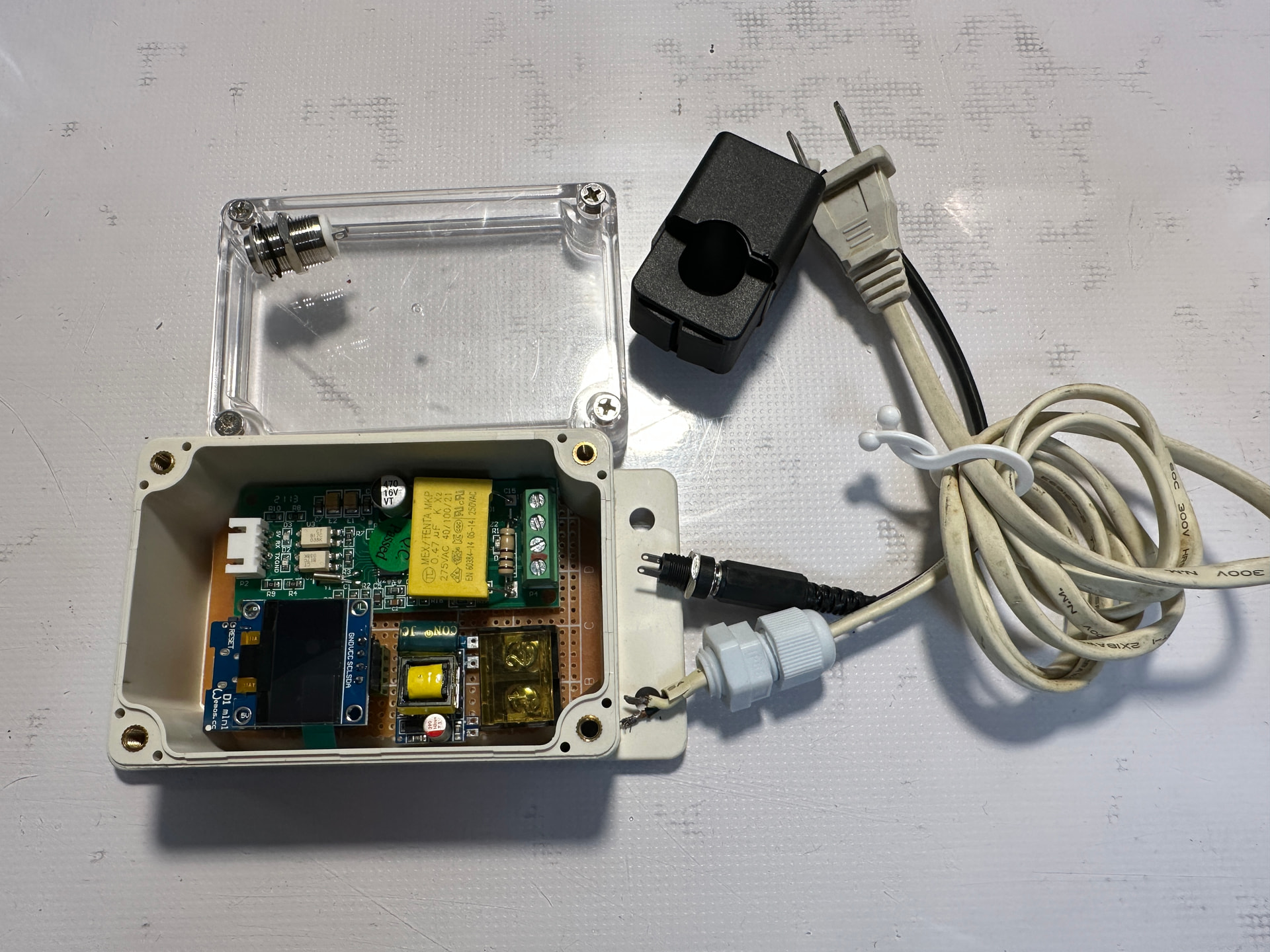
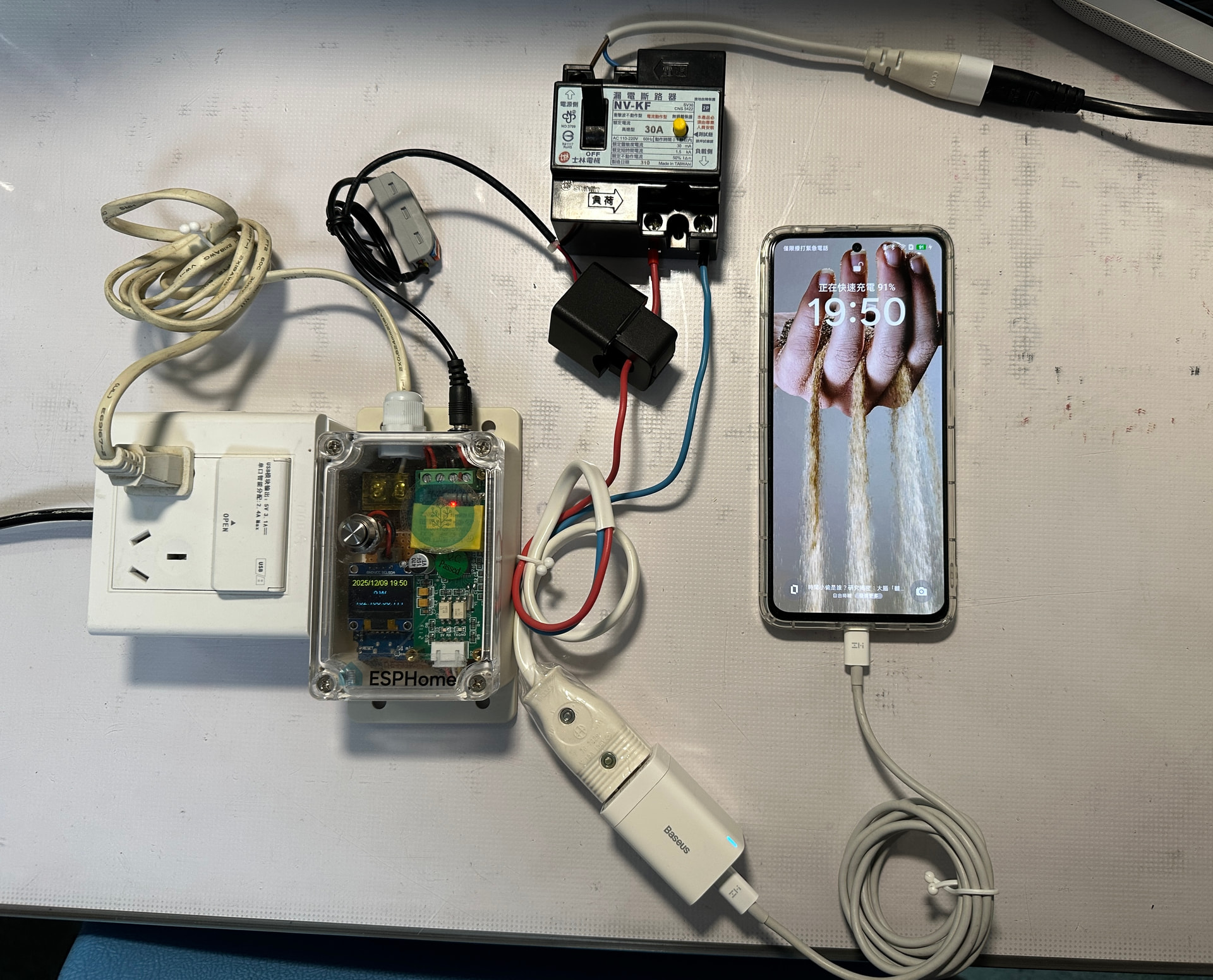
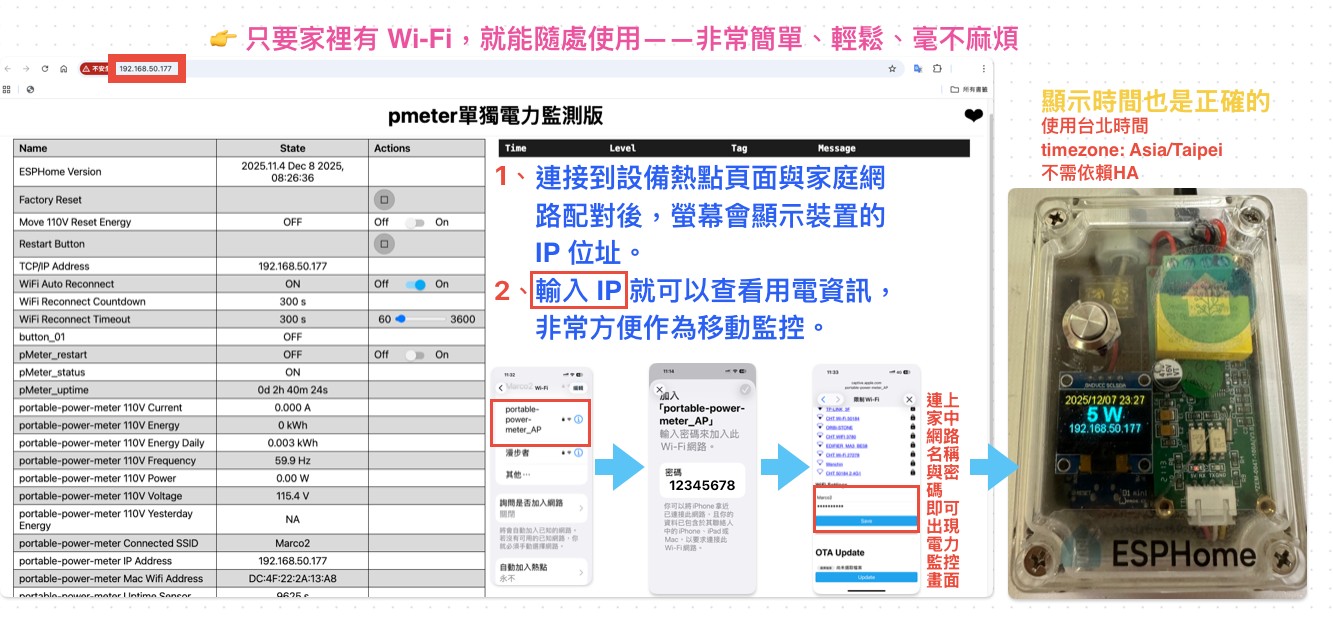
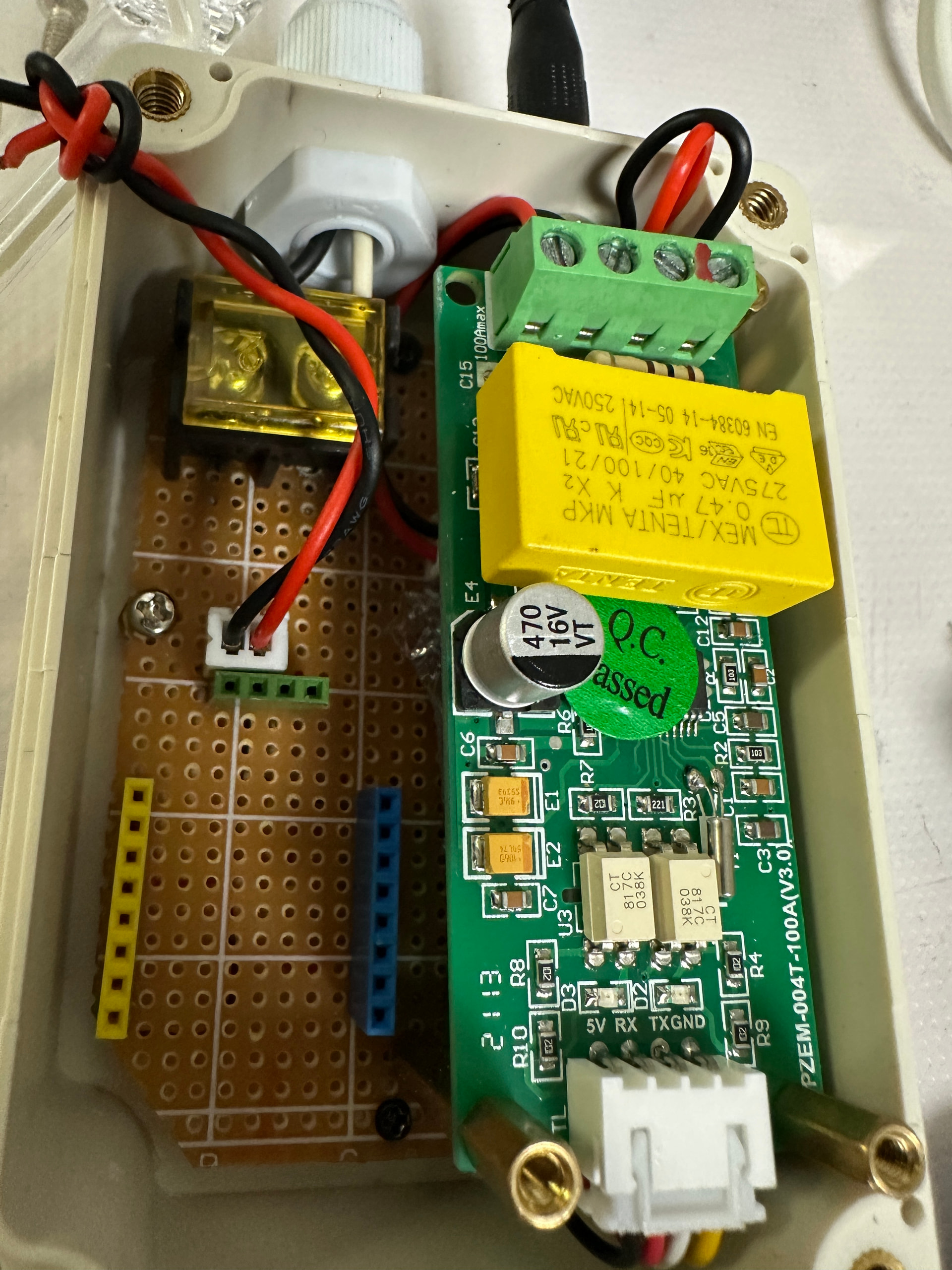
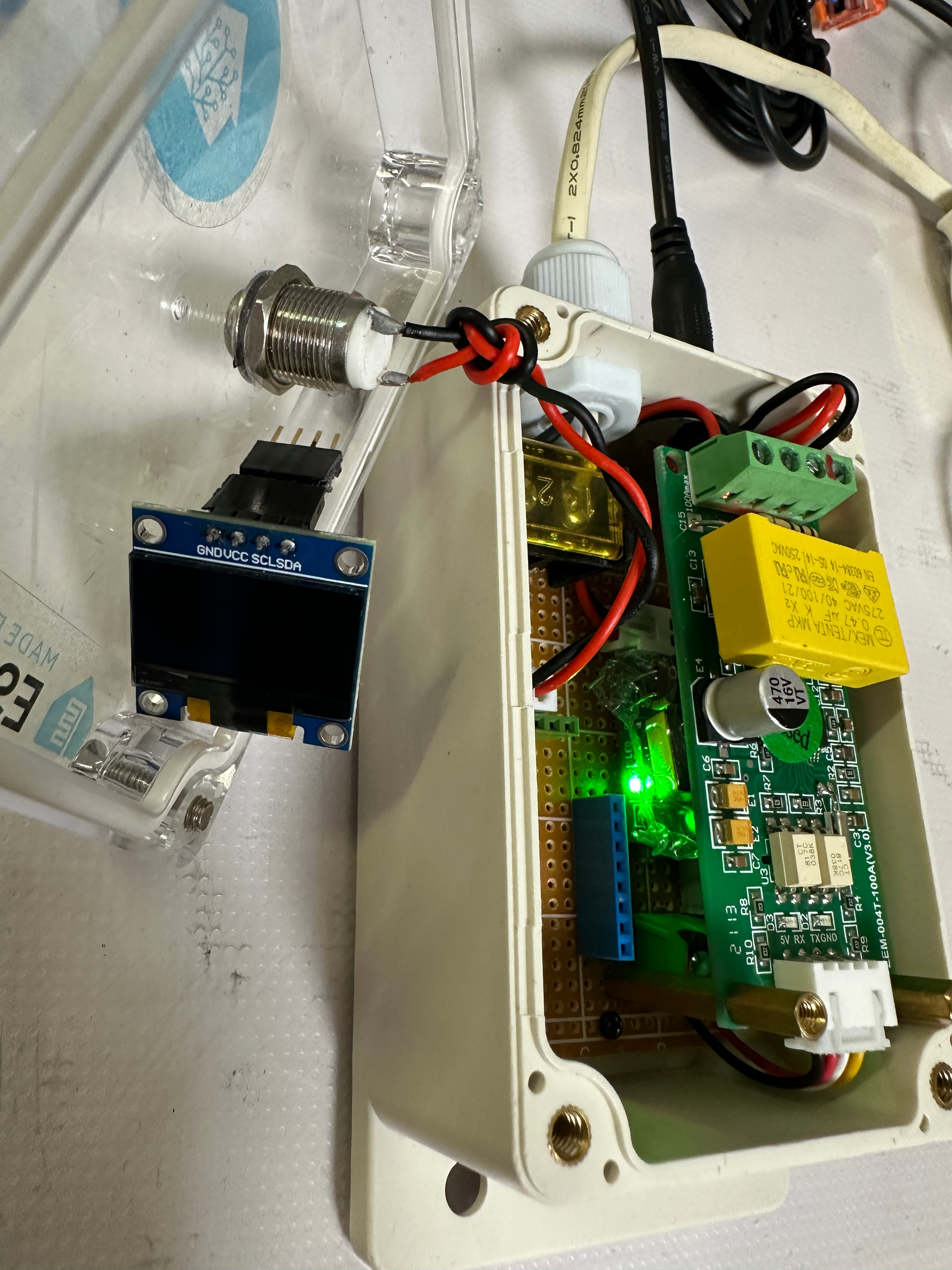


  # https://github.com/PricelessToolkit/PowerMeter/tree/main
  # https://www.youtube.com/watch?v=dMA6r-ai6mg
  # https://github.com/PricelessToolkit/PowerMeter/blob/main/ESPHome/pmeter.yaml
  # https://github.com/PricelessToolkit/PowerMeter/blob/main/PresenceDetection/wifipresencedetection.yaml
  # 螢幕版http://psenyukov.ru/%D0%BC%D0%BE%D0%BD%D0%B8%D1%82%D0%BE%D1%80%D0%B8%D0%BD%D0%B3-%D1%8D%D0%BB%D0%B5%D0%BA%D1%82%D1%80%D0%BE%D1%8D%D0%BD%D0%B5%D1%80%D0%B3%D0%B8%D0%B8-%D1%81-%D0%BF%D0%BE%D0%BC%D0%BE%D1%89%D1%8C%D1%8E/
  # https://www.youtube.com/watch?v=Cv20o5_Su5I
################################################################################################
# Portable Power Meter (Optimized Final Version)
################################################################################################
substitutions:
  device_name: portable-power-meter

esphome:
  name: ${device_name}
  friendly_name: pmeter單獨電力監測移動版
  on_boot:
    priority: -10
    then:
      - delay: 3s
      - lambda: |-
          id(my_display).turn_off();
################################################################################################
esp8266:
  board: d1_mini
  framework:
    version: latest
  restore_from_flash: false
################################################################################################
# Logging
################################################################################################
logger:
  baud_rate: 0
  level: ERROR
################################################################################################
# Home Assistant API
################################################################################################
api:
  reboot_timeout: 0s
################################################################################################
# OTA 更新
################################################################################################
ota:
  - platform: esphome
################################################################################################
# Web 伺服器
################################################################################################
web_server:
  port: 80
################################################################################################
# WiFi 設定
################################################################################################
wifi:
  min_auth_mode: WPA2

  ap:
    ssid: "${device_name}_AP"
    password: !secret ap_password

captive_portal:

################################################################################################
# 全域變數
################################################################################################
globals:
  - id: oled_timeout_sec
    type: int
    initial_value: '30'   # OLED 亮 30 秒後自動關閉
################################################################################################
# 按鈕:系統 Restart
################################################################################################
button:
  - platform: restart
    name: "Restart Button"
    id: restart_button
################################################################################################
# I2C / UART / Modbus
################################################################################################
i2c:
  sda: D2
  scl: D1
  scan: true
################################################################################################
uart:
  - id: ubus1
    tx_pin: GPIO1        # TX → PZEM RX
    rx_pin: GPIO3        # RX → PZEM TX
    baud_rate: 9600
    stop_bits: 1
################################################################################################
modbus:
  - id: modbus1
    uart_id: ubus1
################################################################################################
# 時間同步(HA + SNTP)
################################################################################################
time:
  - platform: homeassistant
    id: homeassistant_time
    on_time:
      - seconds: 59
        minutes: 59
        hours: 23
        then:
          - sensor.template.publish:
              id: PZEM004T_Move_YESTERDAY_ENERGY
              state: !lambda return id(PZEM004T_Move_ENERGY).state;
################################################################################################
  - platform: sntp
    id: esptime
    timezone: Asia/Taipei
################################################################################################
# WiFi 自動重連開關 + OLED 開關
################################################################################################
switch:
  - platform: template
    name: "${device_name} 螢幕狀態"
    id: sw
    restore_mode: ALWAYS_OFF
    lambda: |-
      return id(my_display).is_on();
    turn_on_action:
      - lambda: id(my_display).turn_on();
    turn_off_action:
      - lambda: id(my_display).turn_off();
################################################################################################
  - platform: restart
    name: "pMeter_restart"
################################################################################################
  - platform: uart
    uart_id: ubus1
    name: "Move 110V Reset Energy"
    data: [0x01, 0x42, 0x80, 0x11]
################################################################################################
# 按鈕:單擊亮屏、雙擊關屏(特別最佳化過)
################################################################################################
binary_sensor:
- platform: gpio
  id: button_01
  pin:
    number: GPIO14
    mode: INPUT_PULLUP
    inverted: true
  filters:
    - delayed_on: 50ms
    - delayed_off: 50ms
  on_multi_click:
################################################################################################
    # 單擊:開螢幕 + 重設倒數
    - timing:
        - ON for at most 1s
        - OFF for at least 400ms
      then:
        - text_sensor.template.publish:
            id: buttons
            state: "button_01_single"
        - switch.turn_on: sw                 # 開螢幕
        - script.execute: oled_off_timer     # 重設倒數
        - delay: 2s
        - text_sensor.template.publish:
            id: buttons
            state: ""
################################################################################################
    # 雙擊:關螢幕
    - timing:
        - ON for at most 1s
        - OFF for at most 399ms
        - ON for at most 1s
        - OFF for at least 400ms
      then:
        - text_sensor.template.publish:
            id: buttons
            state: "button_01_double"
        - switch.turn_off: sw                # 關螢幕
        - delay: 2s
        - text_sensor.template.publish:
            id: buttons
            state: ""
################################################################################################
# PZEM-004T V3 – 電壓/電流/功率/頻率/能耗
################################################################################################
sensor:
  - platform: pzemac
    energy:
      name: "${device_name} 110V Energy"
      filters:
        - multiply: 0.001   # Wh → kWh
      unit_of_measurement: kWh
################################################################################################
    frequency:
      name: "${device_name} 110V Frequency"
      id: PZEM004T_Move_Frequency
################################################################################################
    voltage:
      name: "${device_name} 110V Voltage"
      id: PZEM004T_Move_Voltage
################################################################################################
    current:
      name: "${device_name} 110V Current"
      id: PZEM004T_Move_Current
################################################################################################
    power:
      name: "${device_name} 110V Power"
      id: PZEM004T_Move_POWER
################################################################################################
    update_interval: 6s
    modbus_id: modbus1
################################################################################################
# 每日電量統計(自動歸零)
################################################################################################
  - platform: total_daily_energy
    name: "${device_name} 110V Energy Daily"
    power_id: PZEM004T_Move_POWER
    id: PZEM004T_Move_ENERGY
    accuracy_decimals: 3
    filters:
      - multiply: 0.001   # W → kW
    unit_of_measurement: kWh
################################################################################################
# 昨日電量(由 on_time 自動更新)
################################################################################################
  - platform: template
    name: "${device_name} 110V Yesterday Energy"
    id: PZEM004T_Move_YESTERDAY_ENERGY
    unit_of_measurement: "kWh"
    accuracy_decimals: 2
    icon: mdi:power
    update_interval: 60s
################################################################################################
# Uptime
################################################################################################
  - platform: uptime
    name: "${device_name} Uptime Sensor"
    id: uptime_sec
################################################################################################
# 字型(你已確認 arial.ttf 已放在 ESPHome 目錄內)
################################################################################################
font:
  - file: "arial.ttf"
    id: font1
    size: 16
################################################################################################
# OLED 顯示 SSD1306(最佳化後)
################################################################################################
display:
  - platform: ssd1306_i2c
    model: SSD1306_128X64
    address: 0x3C
    id: my_display
    pages:
      - id: page1
        lambda: |-
          // 時間
          it.strftime(64, 0, id(font1), TextAlign::TOP_CENTER,
                      "%Y/%m/%d %H:%M", id(esptime).now());

          // 功率
          it.printf(64, 38, id(font1), TextAlign::BASELINE_CENTER,
                    "%.0f W", id(PZEM004T_Move_POWER).state);

          // IP 位址
          it.printf(64, 56, id(font1), TextAlign::BASELINE_CENTER,
                    "%s", id(tcp_ip_address).state.c_str());
################################################################################################
# Script:OLED 自動關閉計時(已最佳化)
################################################################################################
script:
  # 倒數關閉 OLED
  - id: oled_off_timer
    mode: restart
    then:
      - delay: !lambda 'return (uint32_t)(id(oled_timeout_sec) * 1000);'
      - lambda: |-
          id(my_display).turn_off();

  # OLED Reset(I2C 重置)
  - id: oled_reset
    then:
      - lambda: |-
          id(my_display).setup();
################################################################################################
# Text Sensors(IP / Buttons / Uptime)
################################################################################################
text_sensor:
  # 顯示 TCP/IP(顯示在 OLED)
  - platform: template
    name: "TCP/IP Address"
    id: tcp_ip_address
    lambda: |-
      return { WiFi.localIP().toString().c_str() };
################################################################################################
  # Button 狀態
  - platform: template
    name: ${device_name}Switches
    id: buttons
    icon: "mdi:light-switch"
    lambda: |-
      return {};
################################################################################################
  # Uptime 轉字串
  - platform: template
    name: pMeter_uptime
    id: uptime_text
    icon: mdi:clock-start
    update_interval: 113s
    lambda: |-
      int seconds = (int) id(uptime_sec).state;
      int days = seconds / 86400;
      seconds %= 86400;
      int hours = seconds / 3600;
      seconds %= 3600;
      int minutes = seconds / 60;
      seconds %= 60;

      char buffer[32];
      sprintf(buffer, "%dd %dh %dm %ds", days, hours, minutes, seconds);
      return {buffer};
################################################################################################
# WiFi Info Sensor(多提供一組 IP,給 HA 用)
################################################################################################
  - platform: wifi_info
    ip_address:
      name: "${device_name} IP Address"
      icon: "mdi:ip-network"
################################################################################################
# Interval:若螢幕亮著,持續重置倒數
################################################################################################
interval:
  - interval: 60s
    then:
      - if:
          condition:
            lambda: 'return id(my_display).is_on() && !id(oled_off_timer).is_running();'
          then:
            - script.execute: oled_off_timer
################################################################################################